

Learn the basics of CSS Grid🎯
A Thread ↓
A Thread ↓

What is Grid ?
It is a two-dimensional grid-based layout system.
Designing web pages has become easy with grids. It can have items placed on it vertically, horizontally, or both at once. You can arrange items however you want, even stacked.
It is a two-dimensional grid-based layout system.
Designing web pages has become easy with grids. It can have items placed on it vertically, horizontally, or both at once. You can arrange items however you want, even stacked.

Grid terminology
It is important to understand Grid terminology before learning about its properties.
Let’s jump right in👇
It is important to understand Grid terminology before learning about its properties.
Let’s jump right in👇
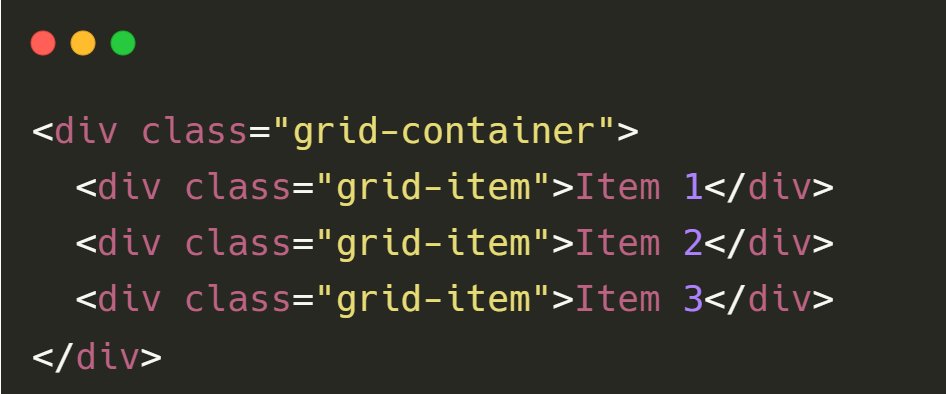
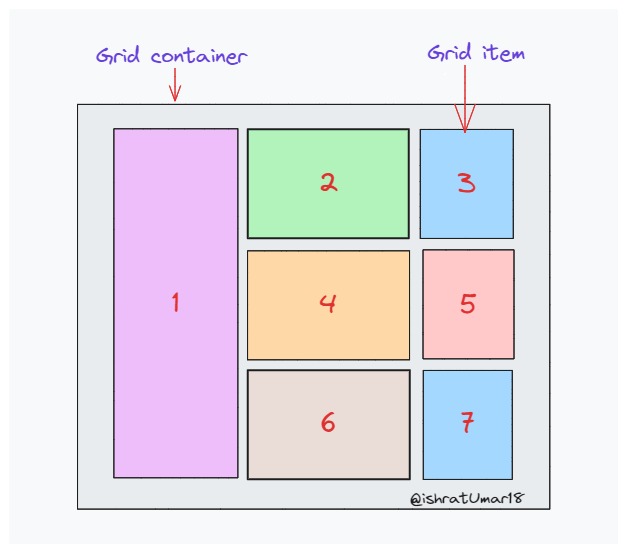
1. Grid container & grid items
The Grid container is the parent element in a grid layout with one or more child elements.
The Grid container is the parent element in a grid layout with one or more child elements.
2. Grid lines
Grid elements are composed of horizontal and vertical grid lines. If your grid has three rows and three columns, it will have four column lines and four row lines.
Grid elements are composed of horizontal and vertical grid lines. If your grid has three rows and three columns, it will have four column lines and four row lines.

3. Grid cell
A single unit within a grid layout is referred to as a grid cell. It is the intersection of a row and a column in the grid.
A single unit within a grid layout is referred to as a grid cell. It is the intersection of a row and a column in the grid.

4. Grid gap
In a grid layout, the gap is used to indicate the size of the gutter or space between columns and rows.
In a grid layout, the gap is used to indicate the size of the gutter or space between columns and rows.

5. Grid tracks
The space between two grid lines is referred to as a track. A row track is a space between two row lines, and a column track is a space between two column lines.
The space between two grid lines is referred to as a track. A row track is a space between two row lines, and a column track is a space between two column lines.
6. Grid Area
The grid area consists of several grid cells. It allows items to span a specified number of rows and columns within a grid layout.
The grid area consists of several grid cells. It allows items to span a specified number of rows and columns within a grid layout.

There's a lot to learn about grids. You can get the full concept by reading this blog post or checking out the repo mentioned below.
ishratumar.medium.com
ishratumar.medium.com

I have created a repository dedicated to frontend development, where I will be sharing informative content, tutorials, and practical code examples related to best practices in frontend development.
Check it out here:
github.com
Check it out here:
github.com

That's pretty much it for today. I really hope it gives you a better understanding of CSS Grids. Thank you for reading!
If you found it helpful, like and retweet the first tweet and follow me @ishratUmar18 for more content.
If you found it helpful, like and retweet the first tweet and follow me @ishratUmar18 for more content.
Loading suggestions...