

ChatGPT can give you a kick-start when learning new skills.
But I like to learn through YouTube videos.
With the power of @LangChainAI, you can generate a personalized YouTube study schedule based on a skill you'd like to learn.
Let me show you how: 🧵
#AI
But I like to learn through YouTube videos.
With the power of @LangChainAI, you can generate a personalized YouTube study schedule based on a skill you'd like to learn.
Let me show you how: 🧵
#AI

Before we dive in, this is day 7 of my '7 days of LangChain'.
Every day, I've introduced you to a simple project that will guide you through the basics of LangChain.
Today's a longer one.
Follow @JorisTechTalk to stay up-to-date on my next series.
Let's dive in:
Every day, I've introduced you to a simple project that will guide you through the basics of LangChain.
Today's a longer one.
Follow @JorisTechTalk to stay up-to-date on my next series.
Let's dive in:
High level overview of what's happening:
1️⃣ Generate list of video id's from favorite YT channels
2️⃣ Load all transcripts
3️⃣ Split the transcript
4️⃣ Extract skills
5️⃣ Vectorize
6️⃣ Generate skillset
7️⃣ Find relevant videos.
Let's dive into the code ⬇️
1️⃣ Generate list of video id's from favorite YT channels
2️⃣ Load all transcripts
3️⃣ Split the transcript
4️⃣ Extract skills
5️⃣ Vectorize
6️⃣ Generate skillset
7️⃣ Find relevant videos.
Let's dive into the code ⬇️

P.S.
Check step 10 for a @LangChainAI sneak peek 👀
Check step 10 for a @LangChainAI sneak peek 👀
1. Load YouTube URL's or ID's.
You can do this in two ways:
1️⃣ Add all YouTube videos manually to a list of YouTube URL's.
2️⃣ Auto load all YouTube videos from your favorite channels
Here's the code for both:
(Code for full loop in step 6)
⬇️
You can do this in two ways:
1️⃣ Add all YouTube videos manually to a list of YouTube URL's.
2️⃣ Auto load all YouTube videos from your favorite channels
Here's the code for both:
(Code for full loop in step 6)
⬇️
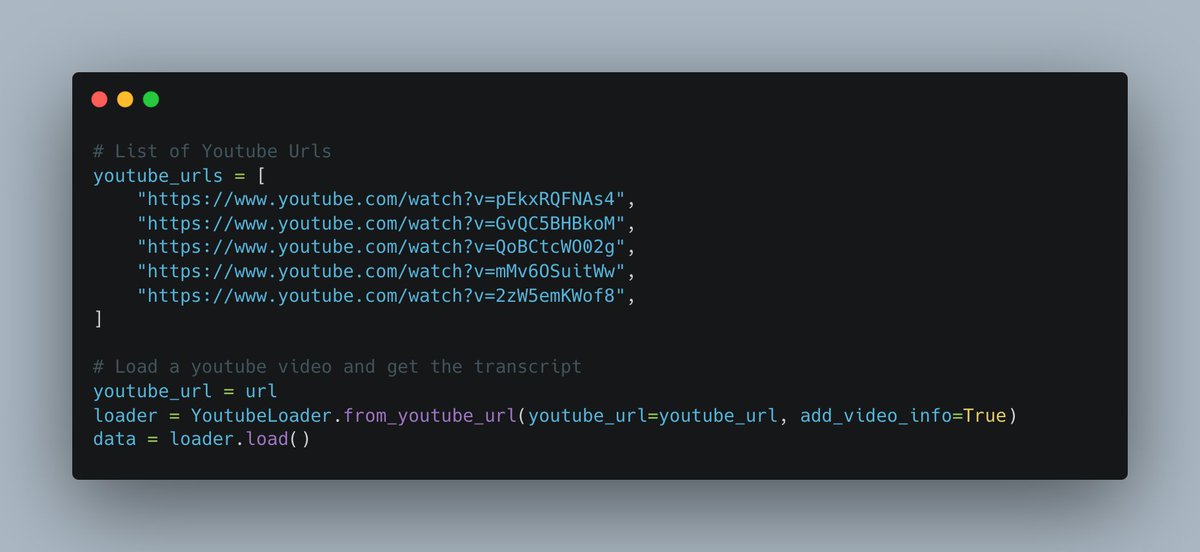
1.1 Manually add to list and load transcripts.
Manually add all your desired YouTube videos to a list.
Loop over the list and load the transcript with @LangChainAI's YouTube Loader.
Save the metadata for further use.
Manually add all your desired YouTube videos to a list.
Loop over the list and load the transcript with @LangChainAI's YouTube Loader.
Save the metadata for further use.
1.2 Automatically load all transcripts from a channel
This step takes a bit more preperation.
You need a Google Dev API Key. Setting this up can be frustrating without help.
Check out the following video on how to do this and enable the YouTube API.
youtube.com
This step takes a bit more preperation.
You need a Google Dev API Key. Setting this up can be frustrating without help.
Check out the following video on how to do this and enable the YouTube API.
youtube.com
1.2.1 Continued
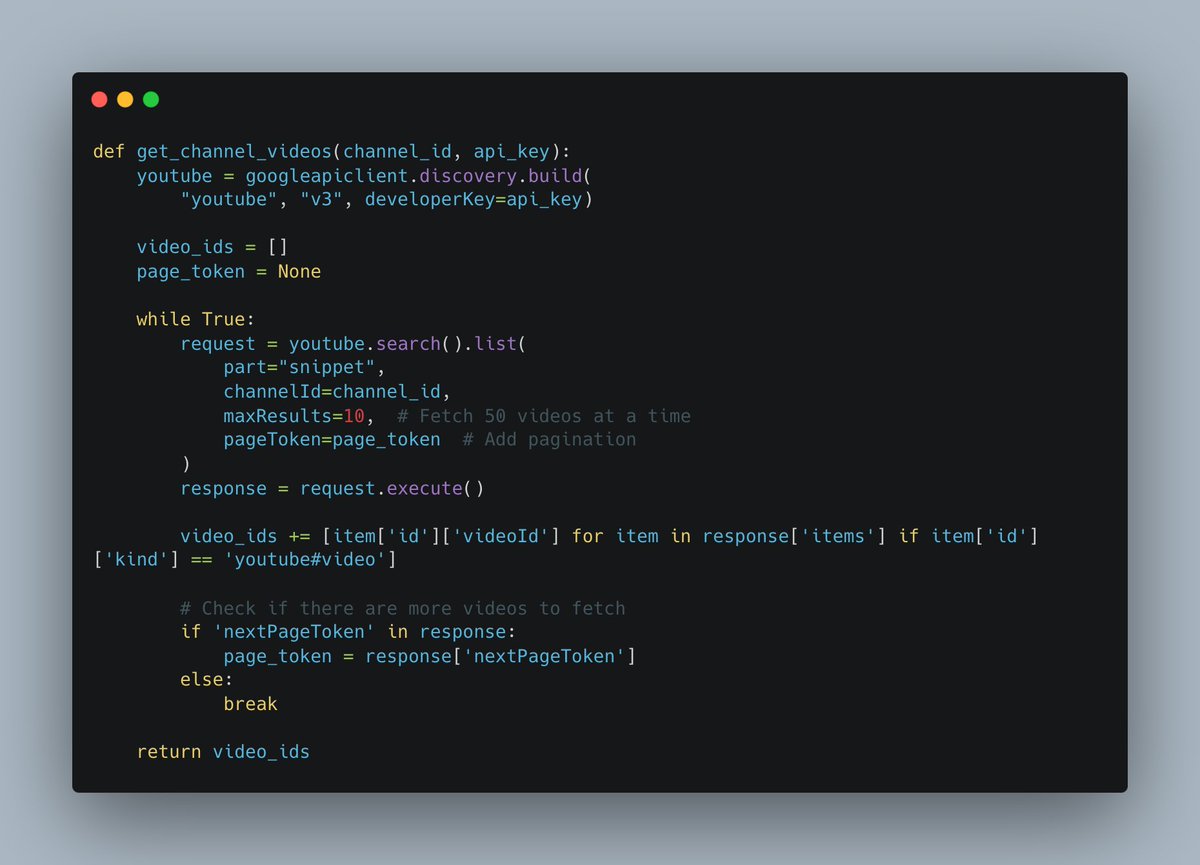
Once you have your API key, you can use the following function to get all video ID's from a specific channel.
BE AWARE: Processing all videos might bankrupt you! 😂
I stole this code from @ehalm_.
Thanks to @LyingWithStats for the recommendation!
Once you have your API key, you can use the following function to get all video ID's from a specific channel.
BE AWARE: Processing all videos might bankrupt you! 😂
I stole this code from @ehalm_.
Thanks to @LyingWithStats for the recommendation!
1.2.2 Continued
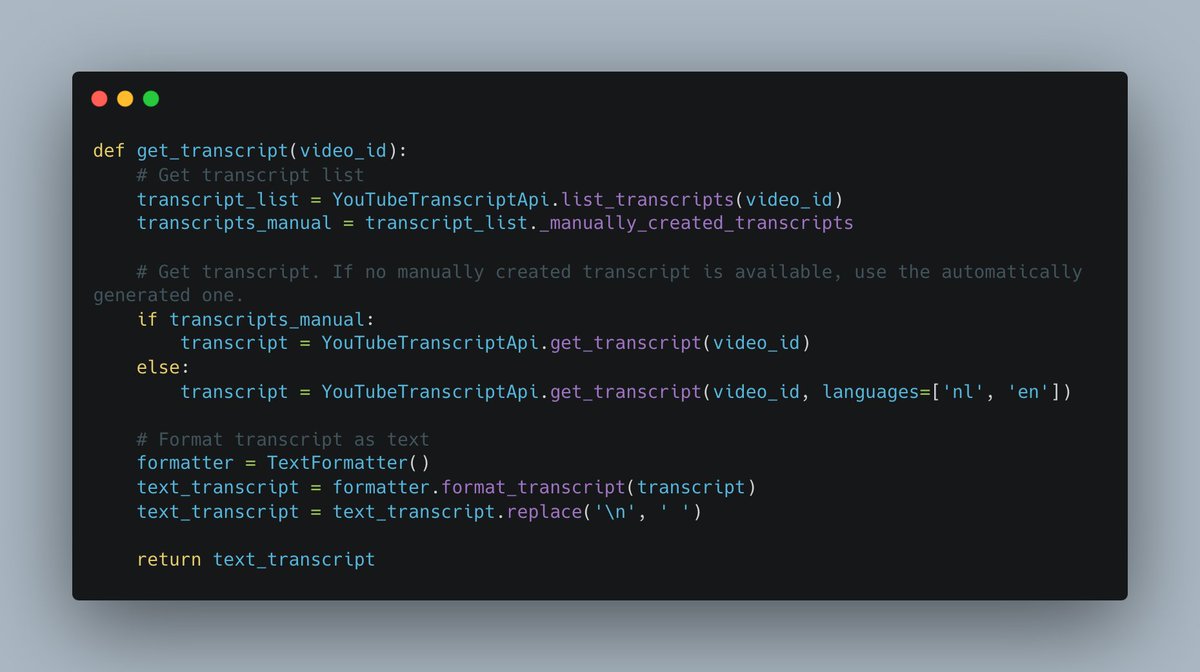
LangChain's YouTube Loader takes in URLs, not IDs.
So use the following function to get the transcripts from all the IDs.
Now we can go forward with cooler stuff.
LangChain's YouTube Loader takes in URLs, not IDs.
So use the following function to get the transcripts from all the IDs.
Now we can go forward with cooler stuff.
2. Saving the meta data and splitting the transcript
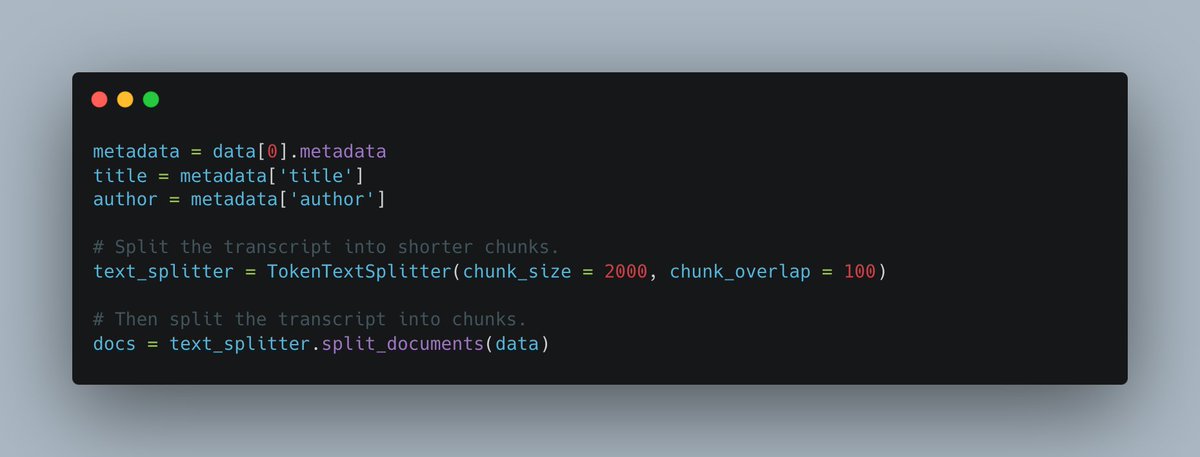
Save metadata from the transcripts to use them later as metadata for the vector stores.
Split the transcripts into documents.
Save metadata from the transcripts to use them later as metadata for the vector stores.
Split the transcripts into documents.
3. Extracting skills.
We now want to extract the discussed skills from the YouTube videos.
We can then use those topics to later search for relevant YouTube videos.
Before we do this: PROMPTING!
We now want to extract the discussed skills from the YouTube videos.
We can then use those topics to later search for relevant YouTube videos.
Before we do this: PROMPTING!
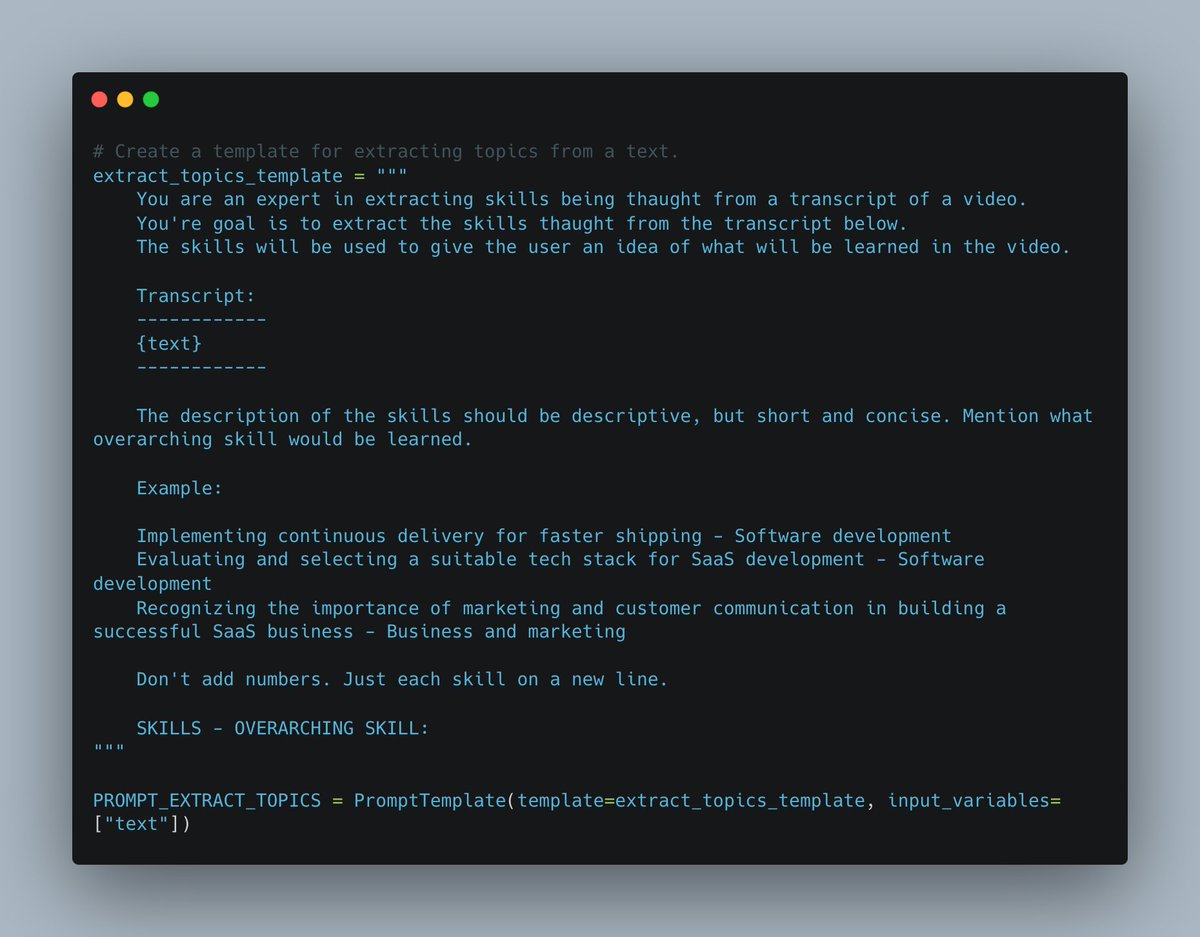
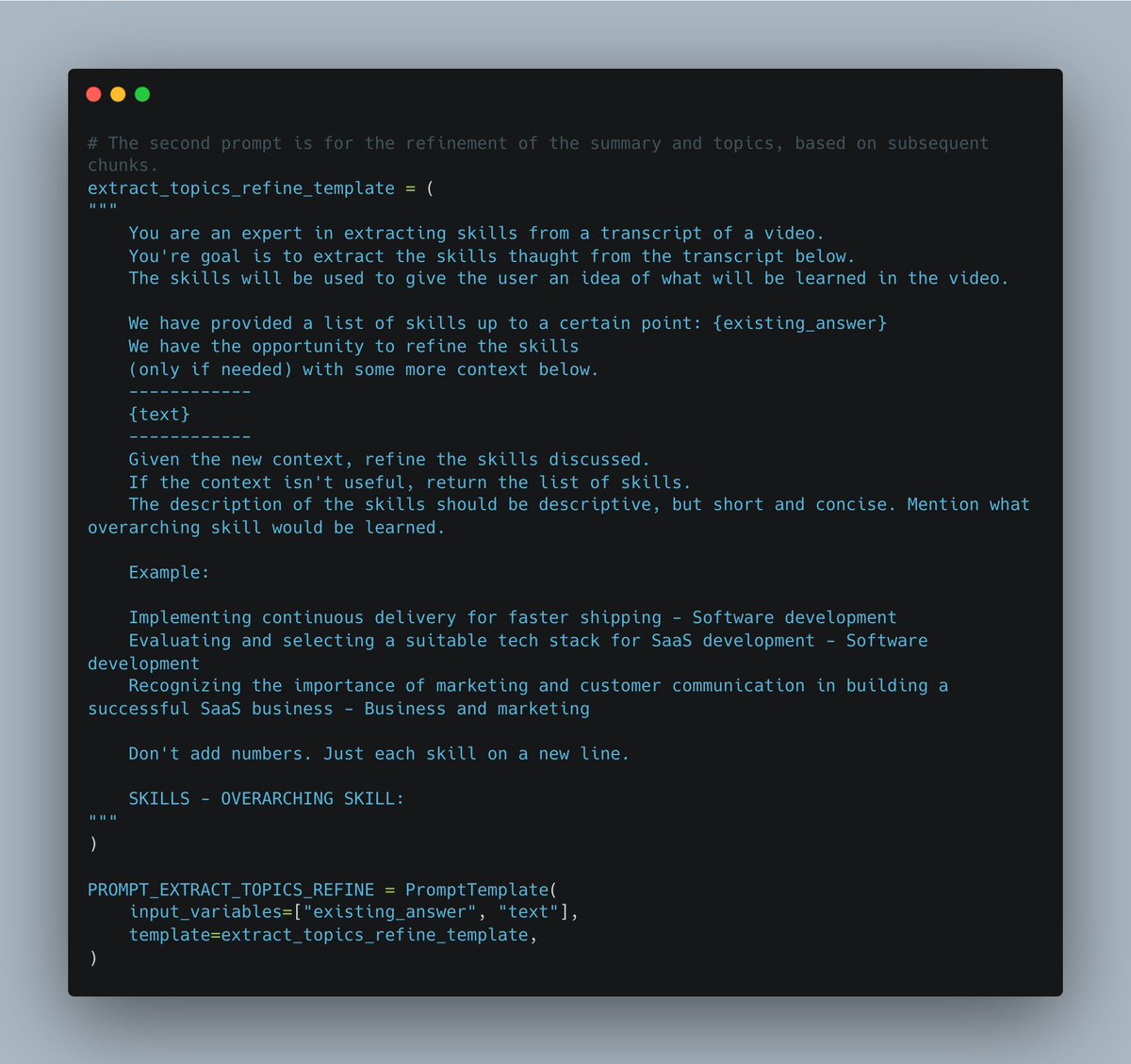
3.1. Prompting for extraction
Prompting is key for getting great results.
I've written two simple prompts for the LLM to extract topics with their overarching skills.
One for initial chunk, one for subsequent chunks.
Play around with these prompts!
Prompting is key for getting great results.
I've written two simple prompts for the LLM to extract topics with their overarching skills.
One for initial chunk, one for subsequent chunks.
Play around with these prompts!
3.2 Initialize and run extraction chain
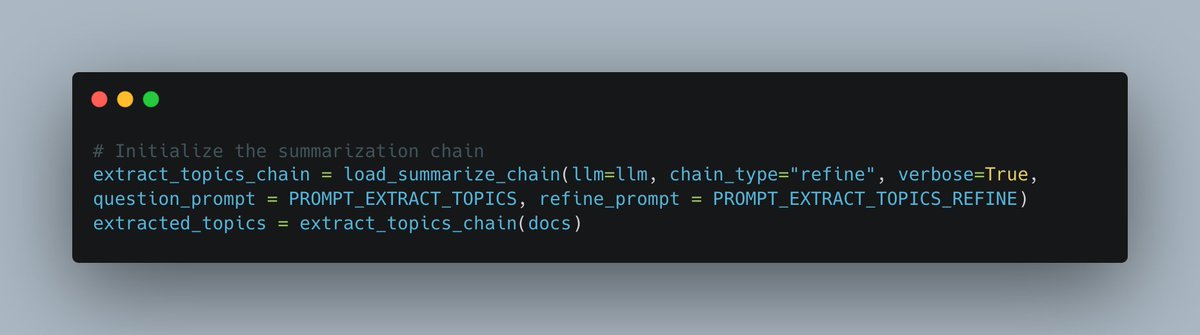
We use a standard summarization chain with chain type 'refine' for this step.
I'll have to do an in-depth thread on different chain types.
Setting verbose to true lets the LLM show its 'thought process'
We use a standard summarization chain with chain type 'refine' for this step.
I'll have to do an in-depth thread on different chain types.
Setting verbose to true lets the LLM show its 'thought process'
4. Create a video overview
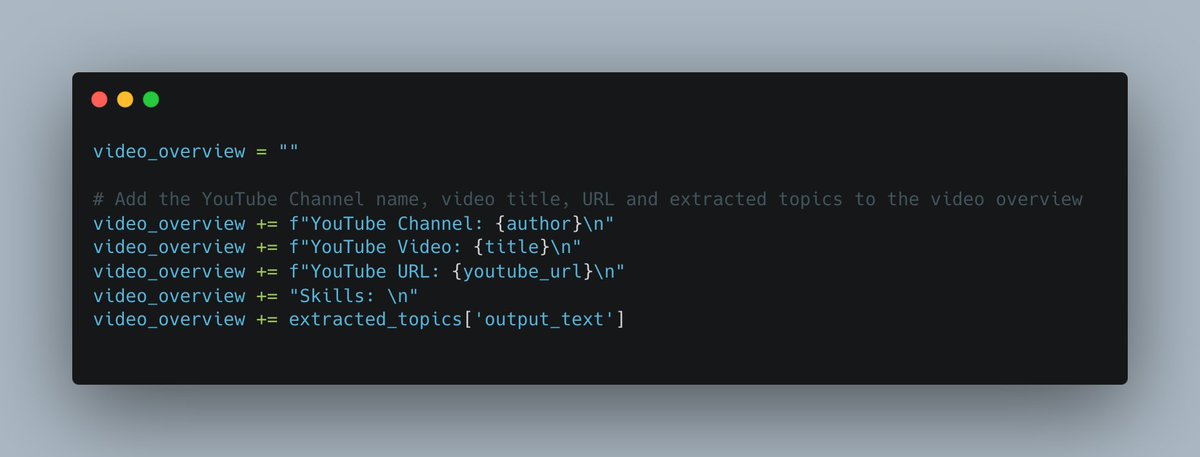
I add this step to add the metadata inside the variable that will be vectorized.
Might be overkill, but doesn't take much time.
I add this step to add the metadata inside the variable that will be vectorized.
Might be overkill, but doesn't take much time.
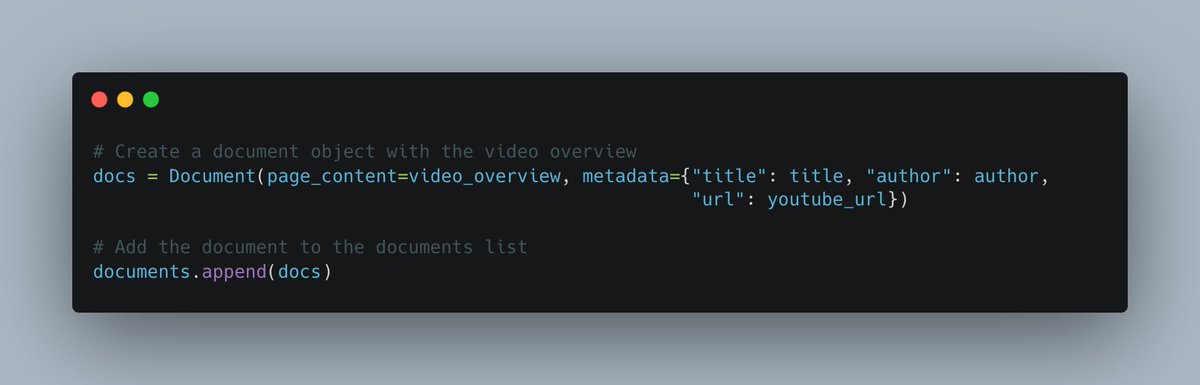
5. Create a Document for the overview
We assign the video overview to a Document class in order to vectorize it once all videos have been processed.
Append the Document to the document list.
We assign the video overview to a Document class in order to vectorize it once all videos have been processed.
Append the Document to the document list.
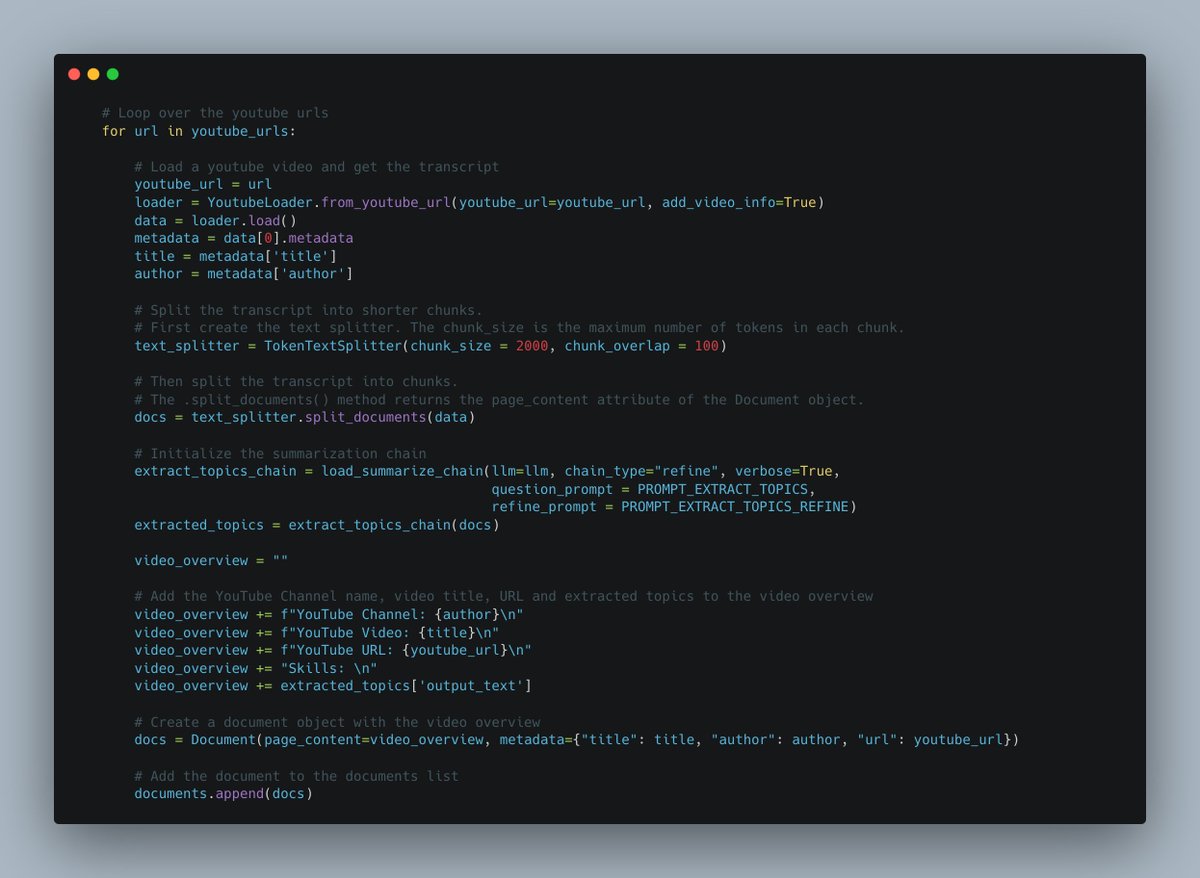
6. Full loop for video processing.
This loop does the dirty work for you. Might take a while to run this for 100 videos.
Once again, be aware that each 15-minute video costs around $0.01 - $0.02 with GPT-3.5-Turbo.
This loop does the dirty work for you. Might take a while to run this for 100 videos.
Once again, be aware that each 15-minute video costs around $0.01 - $0.02 with GPT-3.5-Turbo.
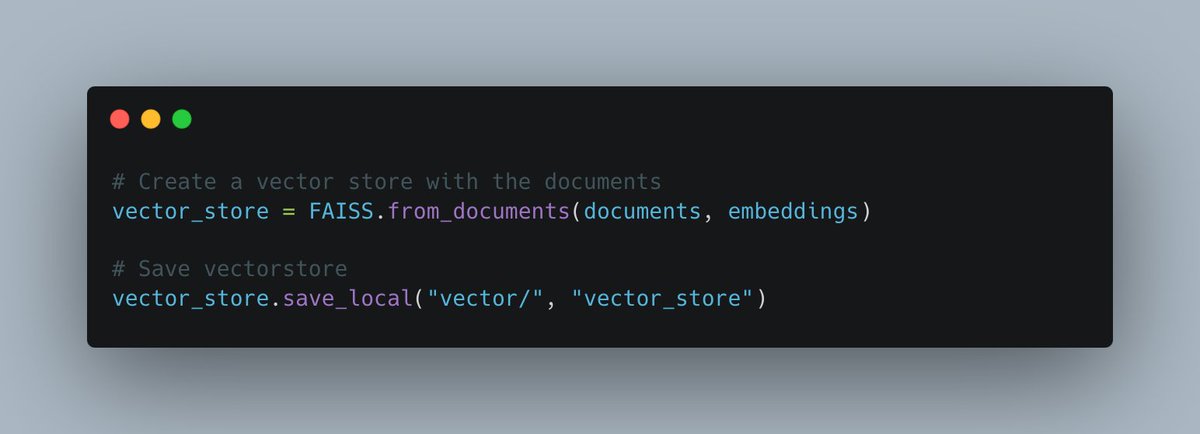
7. Vectorize list of documents.
We can now vectorize the data, to use it later in a retrieval chain.
Save your vector database so you only have to do this process once!
We can now vectorize the data, to use it later in a retrieval chain.
Save your vector database so you only have to do this process once!
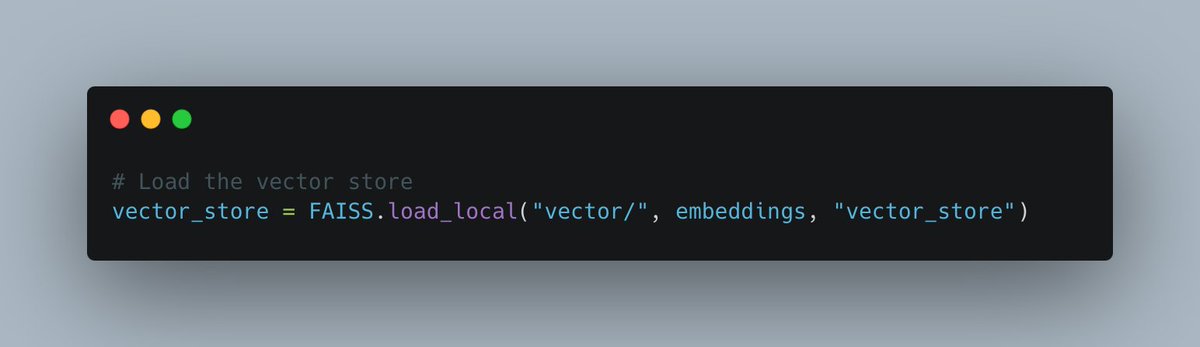
7.1 Optionial: Load vector database
If you've already done step 7 before, you can load your local vector database with the following code:
If you've already done step 7 before, you can load your local vector database with the following code:
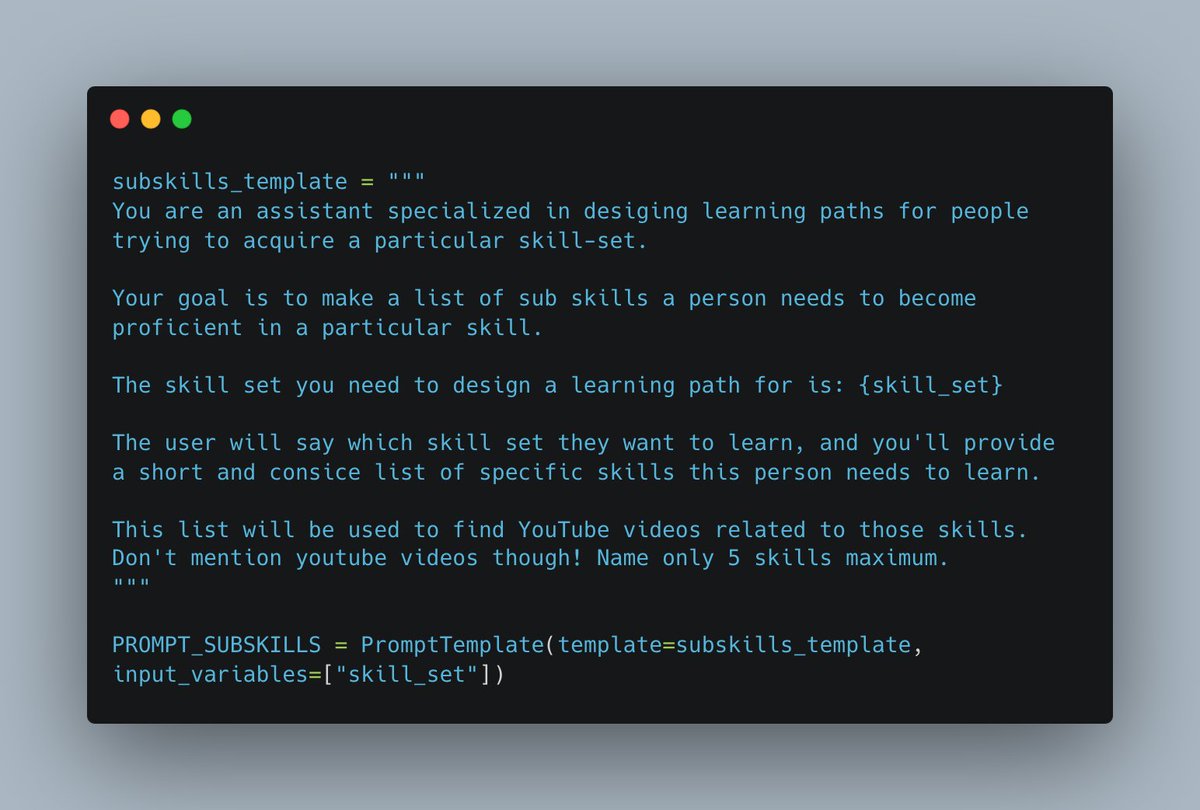
8. Generating list of subskills.
The user can input their desired skill set, for example: software development.
With a custom prompt we will generate a list of subskills to acquire the desired skill.
Reminder: Play around with prompting!
The user can input their desired skill set, for example: software development.
With a custom prompt we will generate a list of subskills to acquire the desired skill.
Reminder: Play around with prompting!

9. Use skillset to find relevant YouTube videos
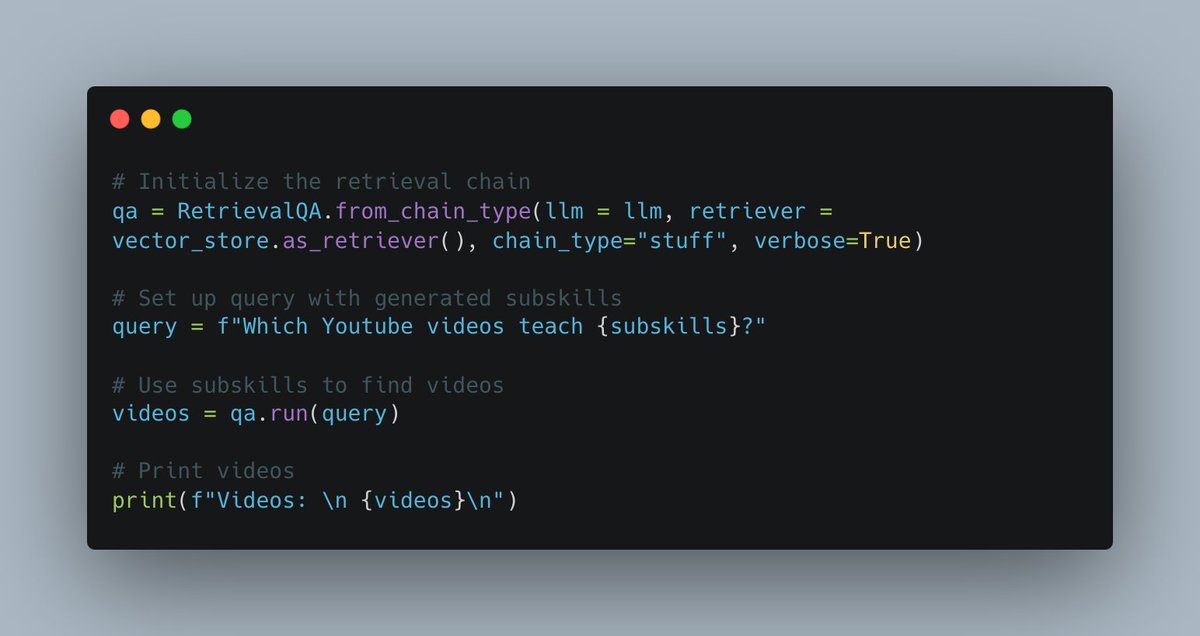
Using the @LangChainAI retrieval chain and your vectorstore as a retriever, the LLM will retrieve relevant YouTube videos for your desired skillset.
It outputs a list of YouTube videos you should watch.
Please experiment here.
Using the @LangChainAI retrieval chain and your vectorstore as a retriever, the LLM will retrieve relevant YouTube videos for your desired skillset.
It outputs a list of YouTube videos you should watch.
Please experiment here.
10. @LangChainAI sneak peek?
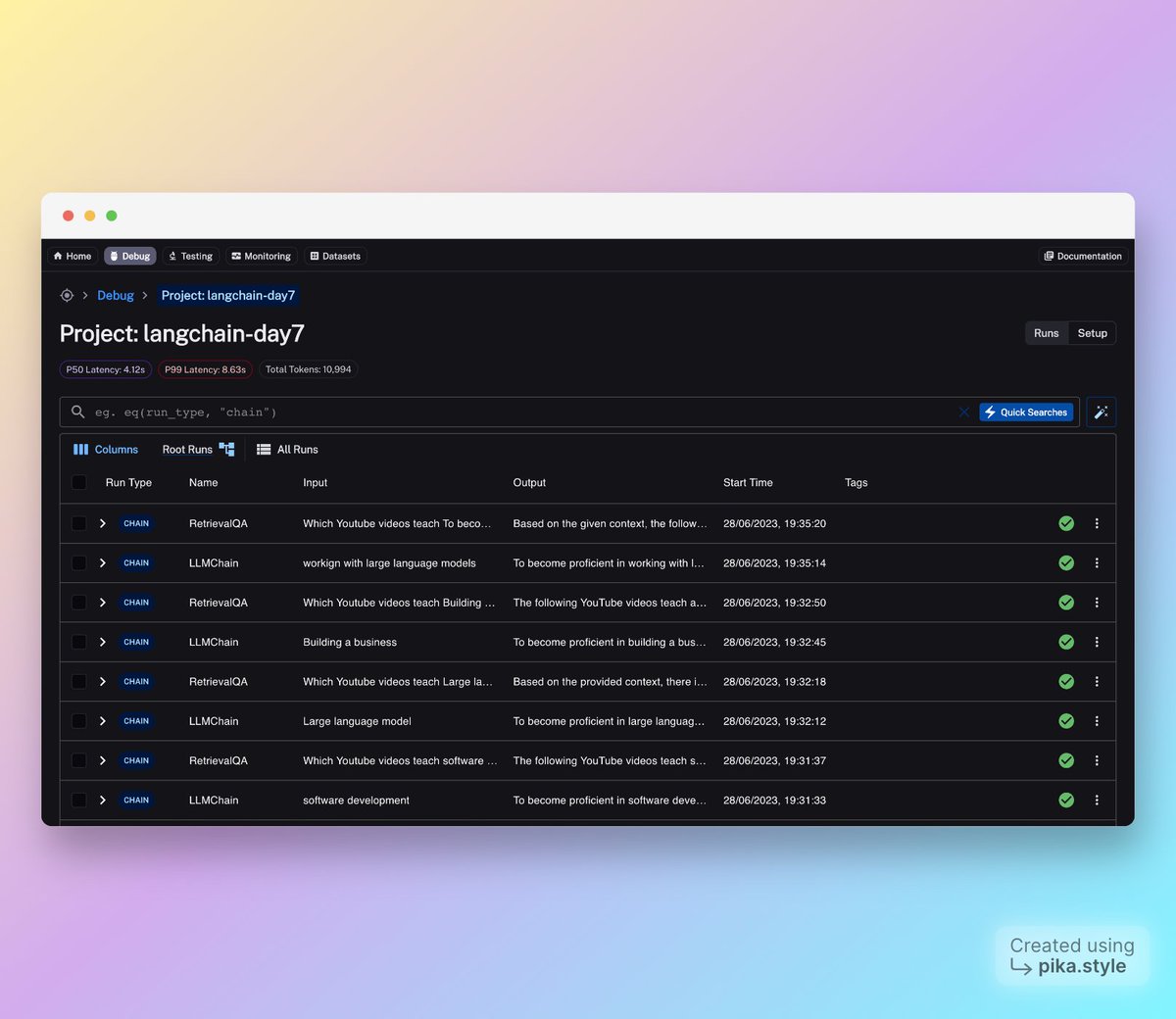
The beautiful people from the LangChain team have provided me access to their upcoming platform.
Since this was a semi-painful project to make in a day, the platform helped me massively.
Stay tuned for updates.
The beautiful people from the LangChain team have provided me access to their upcoming platform.
Since this was a semi-painful project to make in a day, the platform helped me massively.
Stay tuned for updates.
10. GO LEARN
Now go learn.
Play around with the code and show me what you've made!
Full code will be live in GitHub repo tomorrow.
Repo Link: github.com
Now go learn.
Play around with the code and show me what you've made!
Full code will be live in GitHub repo tomorrow.
Repo Link: github.com

Day 7 of '7 days of @LangChainAI' ✅
Still waiting for @YouTube to implement this type of semantic search themselves...
That's it for this series. Loved doing it.
Starting this Friday, I'll be having a two-week vacation.
After that, expect some cool stuff.
Still waiting for @YouTube to implement this type of semantic search themselves...
That's it for this series. Loved doing it.
Starting this Friday, I'll be having a two-week vacation.
After that, expect some cool stuff.
Loading suggestions...