

Reading research papers takes time — a lot of time.
Humata is an AI app that will make:
• Reading articles
• Finding themes
• Taking notes
easier and faster for you.
It's like ChatGPT for your research papers (but without any fake information).
Here's how to use it 🧵
Humata is an AI app that will make:
• Reading articles
• Finding themes
• Taking notes
easier and faster for you.
It's like ChatGPT for your research papers (but without any fake information).
Here's how to use it 🧵
Go to humata(dot)ai and sign up for a free account.

Once logged in, click on the small folder icon and create a folder for your papers.
Click on the folder to open it.
Click on the folder to open it.

Take the folder of research papers that you have downloaded on your computer and drop it in the folder in Humata that you just created.
You don't have to add papers one by one. You can simply drop the whole folder in Humata. Very convenient.
You don't have to add papers one by one. You can simply drop the whole folder in Humata. Very convenient.

Click on the "Ask All" button. Humata will give you a chatbox on the left side.
Start asking questions.
Humata will answer your questions based on the text of your papers. No fake information. It will even cite relevant page numbers.
Ask Humata multiple questions.
Start asking questions.
Humata will answer your questions based on the text of your papers. No fake information. It will even cite relevant page numbers.
Ask Humata multiple questions.

Want to learn how to use AI-powered apps to supercharge your academic writing?
I have a complete tutorial (250+ slides) for you.
It's being used by 2,200+ academics including those at Harvard, Princeton, Yale, and Stanford.
You can get it here:
efficientacademicwriter.carrd.co
I have a complete tutorial (250+ slides) for you.
It's being used by 2,200+ academics including those at Harvard, Princeton, Yale, and Stanford.
You can get it here:
efficientacademicwriter.carrd.co

Next create a collection for your project in Zotero and add all the papers in the collection.
Then click on the "New Note" button and create a "New Standalone Note."
Then click on the "New Note" button and create a "New Standalone Note."

Go back to Humata and click on the "Copy" button. This will copy the text to your clipboard.
Now go to Zotero and paste the answer in the standalone note you just created.
Do it with all your notes. This way you will have your notes neatly organized.
Now go to Zotero and paste the answer in the standalone note you just created.
Do it with all your notes. This way you will have your notes neatly organized.

Found this thread useful?
1. Scroll to the top and retweet the first tweet to share it with your friends.
2. Bookmark it so you can come back to it later.
3. Follow me for regular threads on how to use AI-powered apps for academic purposes.
1. Scroll to the top and retweet the first tweet to share it with your friends.
2. Bookmark it so you can come back to it later.
3. Follow me for regular threads on how to use AI-powered apps for academic purposes.
Want me to email you tips on academic writing?
Sign up for my newsletter. It's FREE!
keepwriting.beehiiv.com
Sign up for my newsletter. It's FREE!
keepwriting.beehiiv.com

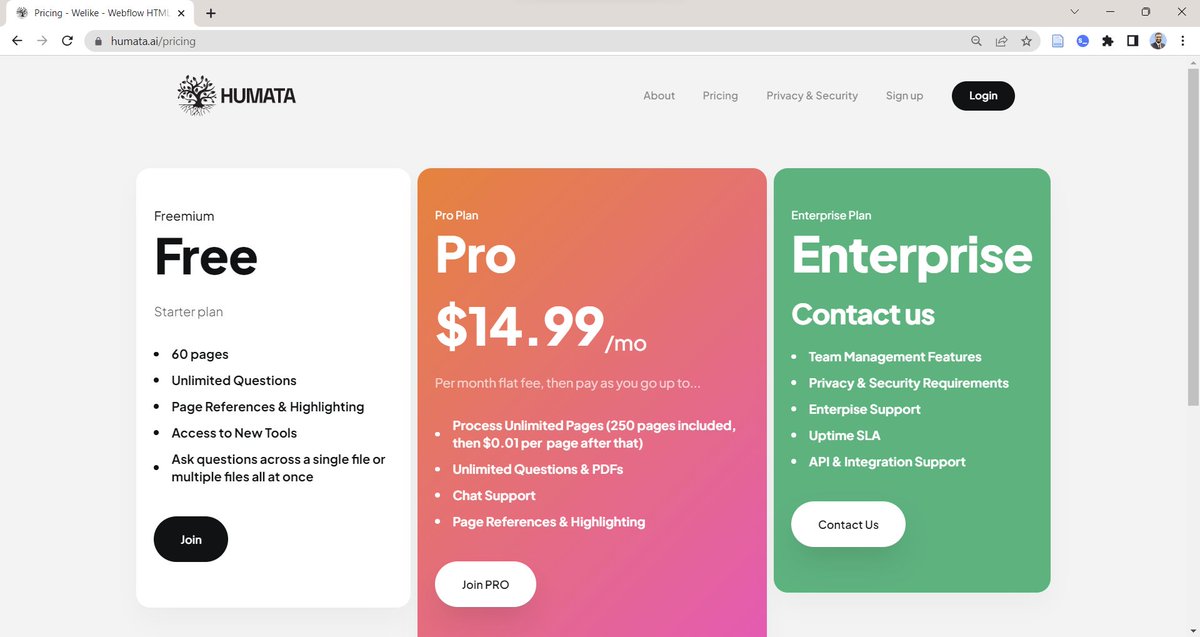
I forgot to add that Humata has both free and paid plans.
The free plan lets you upload 60 pages.
The free plan lets you upload 60 pages.
Loading suggestions...