

I've spent ~$1,000,000 on Google Ads to generate $10,000,000
Here's the same strategy I use when I launch a new product:
A THREAD🧵
Here's the same strategy I use when I launch a new product:
A THREAD🧵

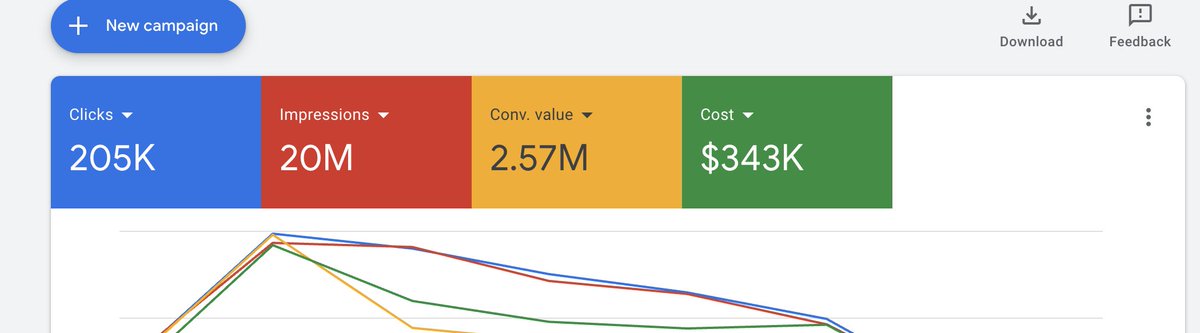
Setting up Google ads and launching a new ad is actually super simple.
Here are the things you need to create in your google ads account:
Generic Campaign
Branded Campaign
Universal Neg KW List
Send to Branded Neg KW List
Product you want to run ads to (an ad group)
Here are the things you need to create in your google ads account:
Generic Campaign
Branded Campaign
Universal Neg KW List
Send to Branded Neg KW List
Product you want to run ads to (an ad group)
Let’s start with the generic and branded campaigns.
The generic and branded campaigns are to separate the keywords so that you’re putting more money towards branded kw than you are generic kw.
The generic and branded campaigns are to separate the keywords so that you’re putting more money towards branded kw than you are generic kw.
Let’s take “drolet wood stoves” for example.
Drolet wood stoves is a branded keyword
Wood stoves is a generic keyword.
It makes sense that we would want to spend more for the branded kw because it’s closer to what the customer is looking for
Drolet wood stoves is a branded keyword
Wood stoves is a generic keyword.
It makes sense that we would want to spend more for the branded kw because it’s closer to what the customer is looking for
Let’s get on to setting the campaigns up.
On google, click create campaign and create a shopping campaign
Branded and Generic (each their own campaign).
Copy these settings for each:
On google, click create campaign and create a shopping campaign
Branded and Generic (each their own campaign).
Copy these settings for each:
For branded campaign: use these settings
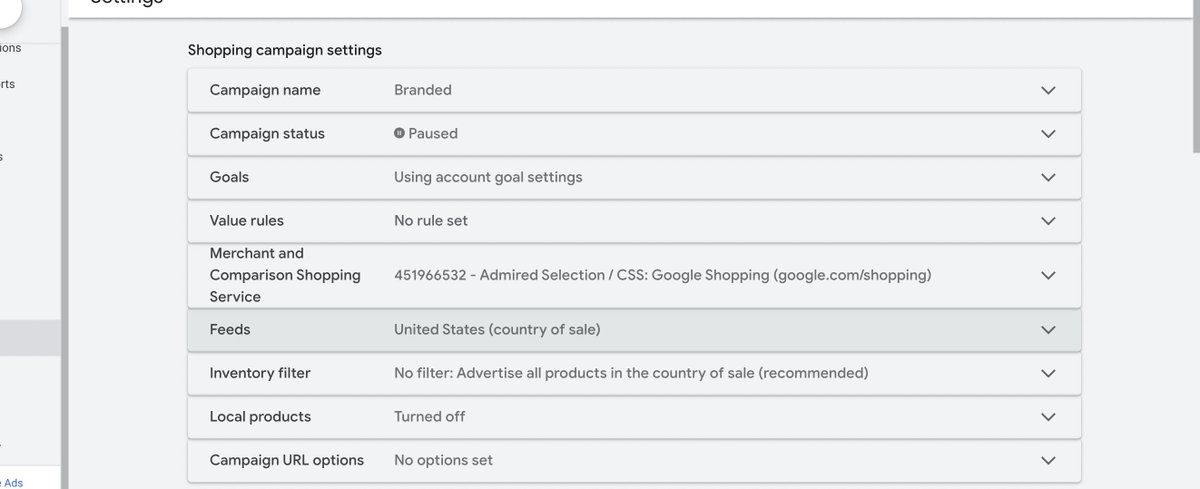
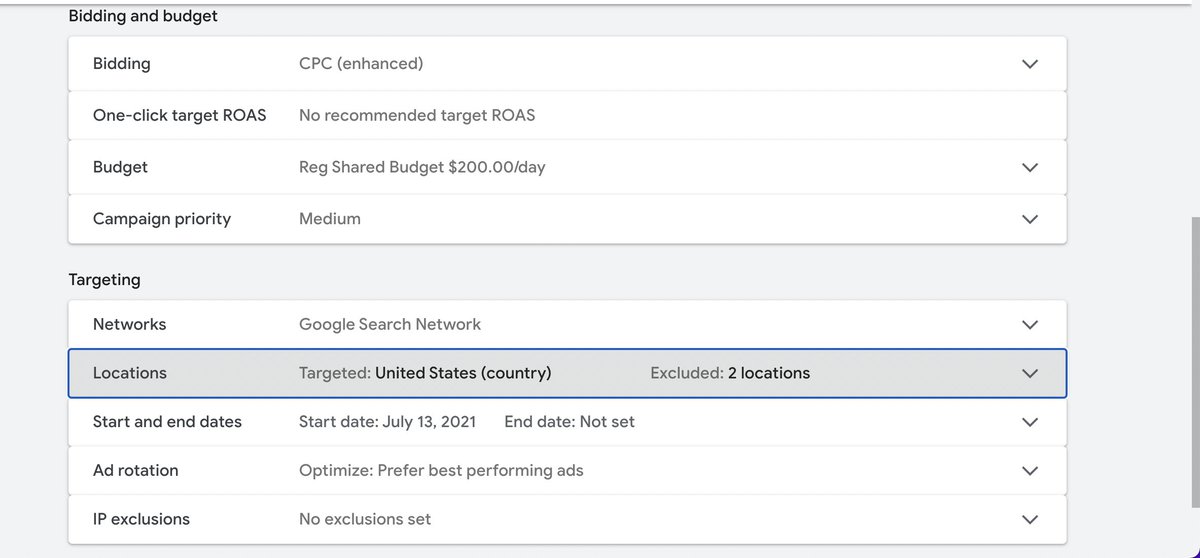
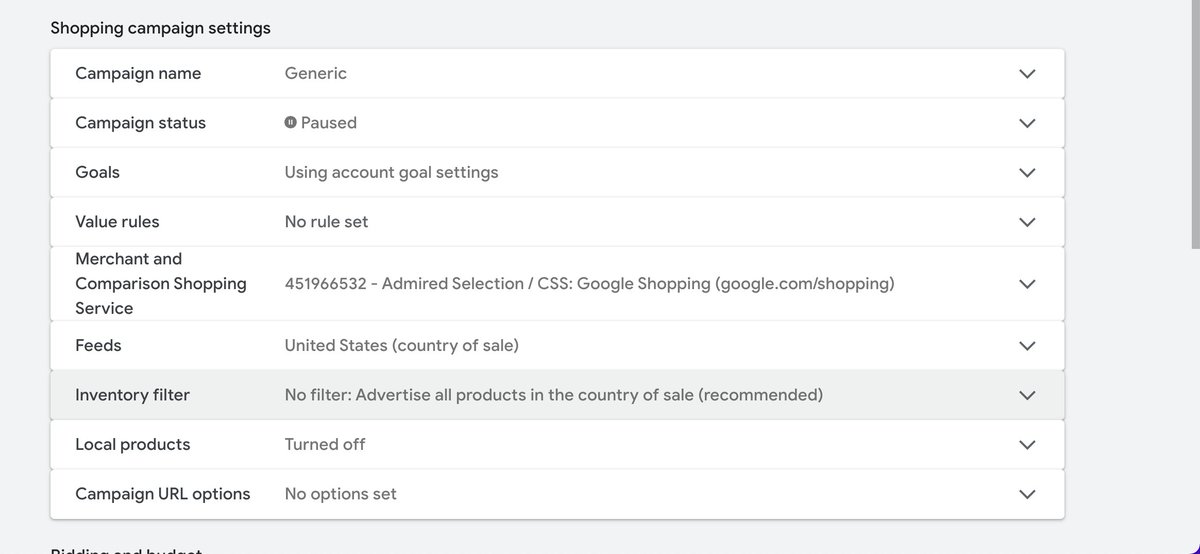
For generic campaign: use these settings (only difference is HIGH campaign priority for generic)
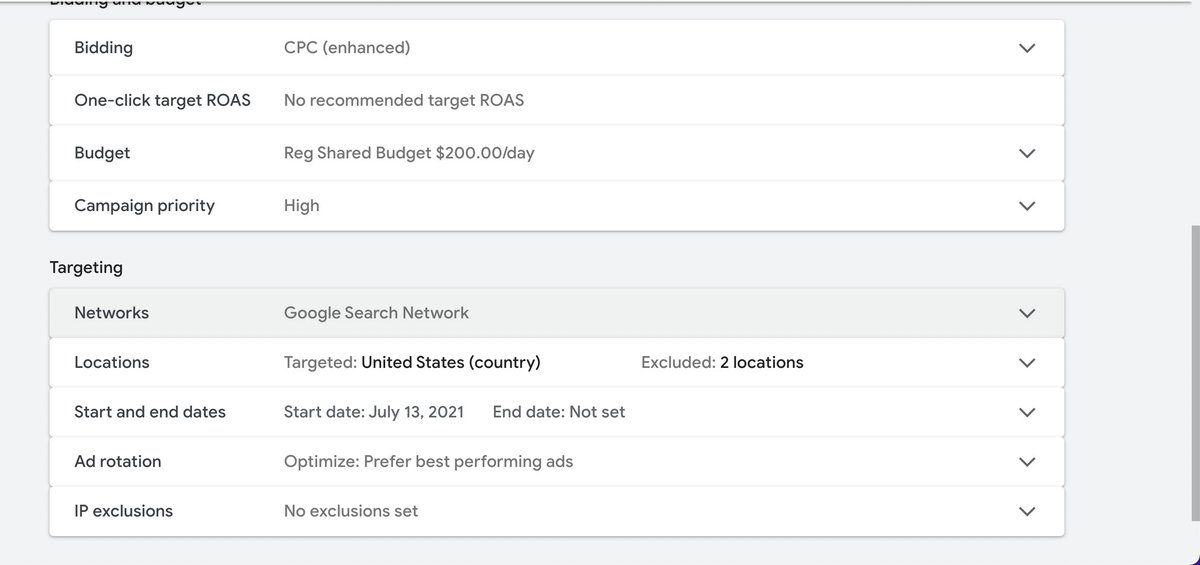
Now, let's if we’re launching drolet wood stoves.
We want to create an AD GROUP for DROLET (the brand or product) under BOTH campaigns
We want to create an AD GROUP for DROLET (the brand or product) under BOTH campaigns
Ad groups are the BRANDS or PRODUCTS that were running ads to that fall under the generic and branded campaigns.
Think of it like a funnel. At the top we have campaign (branded or generic), under that we have ad group (drolet), under that we have product group (wood stoves)
Think of it like a funnel. At the top we have campaign (branded or generic), under that we have ad group (drolet), under that we have product group (wood stoves)
Here’s how to create an ad group under BOTH Generic and Branded campaigns.
Click the campaign and click ad group.
Name the ad group the brand name.
Then...
Click the campaign and click ad group.
Name the ad group the brand name.
Then...
I recommend starting out with 25 cents bid cost per click on generic and a $2 bid cost per click on branded.
This is what you’re willing to pay when a customer clicks on to ur shopping ad
This is what you’re willing to pay when a customer clicks on to ur shopping ad
After creating ad group, filter out the product type that you want, in this case ONLY wood stoves under drolet would be activated.
Do this for both campaigns.
Do this for both campaigns.
Now time to create the 2 KW lists
This is to separate the branded keywords and generic keywords...
This is to separate the branded keywords and generic keywords...
Go to tools and setting and click "create negative kw lists". You'll be creating two lists
Universal Neg KW list
These are kw that you NEVER want to run ads too
Examples
Free
Discount
This list will be applied to ALL campaigns so that we NEVER show up for them EVER.
Universal Neg KW list
These are kw that you NEVER want to run ads too
Examples
Free
Discount
This list will be applied to ALL campaigns so that we NEVER show up for them EVER.
Now, the Send to branded Neg KW list
This is where you add all the branded kw of the product or brand you’re running ads to
Example: Let’s say we’re running ads to drolet wood stoves
This is where you add all the branded kw of the product or brand you’re running ads to
Example: Let’s say we’re running ads to drolet wood stoves
These KW would go into send to branded list:
Drolet
Drolet wood stove
Drolet deco (type of drolet wood stove)
Drolet ht3000 (type of drolet wood stove)
Drolet + any other sku
Etc.
Drolet
Drolet wood stove
Drolet deco (type of drolet wood stove)
Drolet ht3000 (type of drolet wood stove)
Drolet + any other sku
Etc.
This send to branded kw list will ONLY APPLY TO THE GENERIC campaign.
Under generic campaign, you have to apply the KW list to it.
We’re telling google we don’t want to show up for these branded kw in generic. ONLY branded.
And that is the initial set up!
Under generic campaign, you have to apply the KW list to it.
We’re telling google we don’t want to show up for these branded kw in generic. ONLY branded.
And that is the initial set up!


Want to learn how I sell $1,000+ products online without having to buy inventory?
Follow me for more: @anthonytambooo
Join my free high ticket dropshipping course:
highticket.typeform.com
Apply for 1 on 1 coaching:
calendly.com
Follow me for more: @anthonytambooo
Join my free high ticket dropshipping course:
highticket.typeform.com
Apply for 1 on 1 coaching:
calendly.com

calendly.com/high-ticket-dr…
Application Call for High Ticket eCom Coaching (A) - Anthony Tambellini
I want to help you make $10k+ a month with high ticket dropshipping.This is an application call with...

highticket.typeform.com/to/oMXxQChq?ty…
Anthony’s FREE High Ticket Course Access
Turn data collection into an experience with Typeform. Create beautiful online forms, surveys, quizz...
Loading suggestions...