

R.I.P. SQL?
The most powerful AI can now query databases.
Here’s the step by step guide:
The most powerful AI can now query databases.
Here’s the step by step guide:
LangChain is a tool that allows users to build applications with LLMs.
A quick primer:
• Agents can reason, think, and solve problems
• Agents use OpenAI’s GPT LLM to write the SQL
• LangChain agents run the SQL and return results
Here’s the most mind blowing part about it:
A quick primer:
• Agents can reason, think, and solve problems
• Agents use OpenAI’s GPT LLM to write the SQL
• LangChain agents run the SQL and return results
Here’s the most mind blowing part about it:
You can use natural language in your prompt to write this SQL.
Here’s how to do it.
Here’s how to do it.
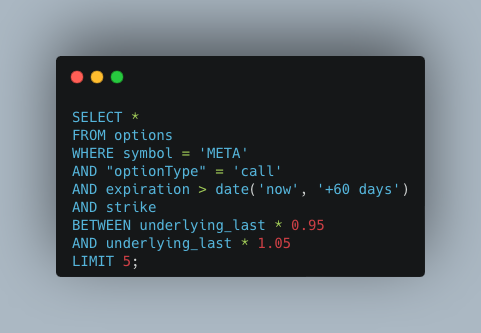
First start with the imports.
You’ll use the OpenBB SDK to grab options data for free and pandas to write the data to a SQLite database.
You can use any database you want.
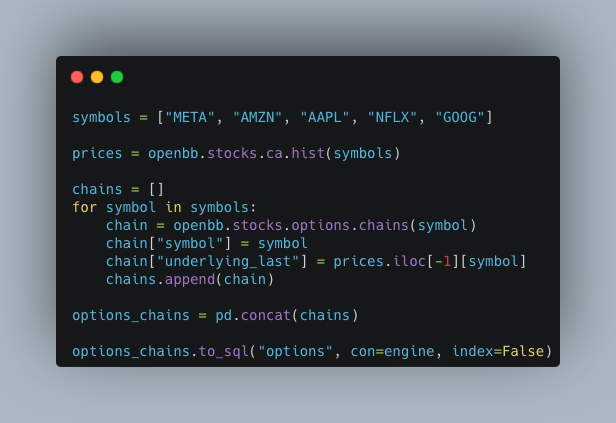
Next, download and store the options data.
You’ll use the OpenBB SDK to grab options data for free and pandas to write the data to a SQLite database.
You can use any database you want.
Next, download and store the options data.

This code iterates through the FAANG stocks, grabs price data, and all the options chains.
You need get price data separately because the options chains don’t have them.
Use pandas to store the data into the SQLite database.
Next, set up LangChain.
You need get price data separately because the options chains don’t have them.
Use pandas to store the data into the SQLite database.
Next, set up LangChain.
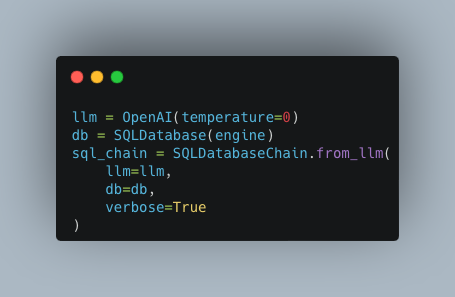
The first step is to create an instance of the LLM, a DB, and a SQL DB chain.
This shows the power of LangChain.
You now have a Python object that represents OpenAI’s cutting edge LLM.
Another LangChain superpower:
Tools
This shows the power of LangChain.
You now have a Python object that represents OpenAI’s cutting edge LLM.
Another LangChain superpower:
Tools
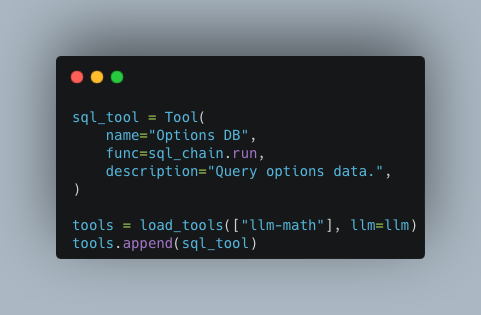
Create the custom LangChain tool that uses the SQL Chain to build SQL queries.
Since LLMs are notoriously bad at basic math, LangChain has a built in math tool.
This helps the LLM do complex math. Load it and append the SQL tool you just built.
Since LLMs are notoriously bad at basic math, LangChain has a built in math tool.
This helps the LLM do complex math. Load it and append the SQL tool you just built.
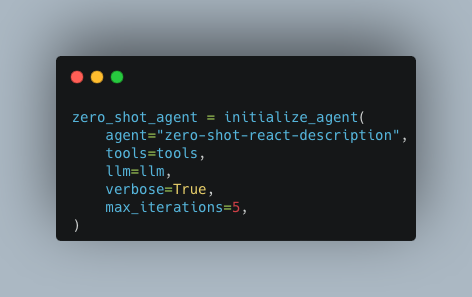
Finally, initialize the LangChain agent.
This uses a zero-shot ReAct agent with no memory.
ReAct is a prompt engineering technique that alternatives between “acting” and “reasoning.”
You’ll see it do this in the output.
This uses a zero-shot ReAct agent with no memory.
ReAct is a prompt engineering technique that alternatives between “acting” and “reasoning.”
You’ll see it do this in the output.
I ask the LLM for the last prices of 5 META call options with expiration date greater than 60 days and a strike price within 5% of the underlying.
Then I use the prompt to instruct the LLM to format the response in a table format.
Finally, run the agent.
Then I use the prompt to instruct the LLM to format the response in a table format.
Finally, run the agent.

You’ll see a bunch of output as the LangChain agent interacts with the database and the LLM.
Look for the SQL statements that are printed out.
Look for the SQL statements that are printed out.

By following along, you can now:
• Download and store options data
• Use OpenAI’s GPT LLM to write SQL
• Build LangChain tools and agents to run it
Pro tip:
You can also connect to remote databases using the same code.
Just replace the connection string.
• Download and store options data
• Use OpenAI’s GPT LLM to write SQL
• Build LangChain tools and agents to run it
Pro tip:
You can also connect to remote databases using the same code.
Just replace the connection string.
Want to start using cutting edge technology for quant finance?
Follow @pyquantnews.
Want to keep this step-by-step guide handy?
Click the tweet below and retweet the top tweet.
Follow @pyquantnews.
Want to keep this step-by-step guide handy?
Click the tweet below and retweet the top tweet.
My professors taught me MATLAB during my master's degree—but no one uses MATLAB except for professors.
So to get a quant job, I spent 1000s of hours teaching myself Python.
Now I share what I've learned over 20 years every week with over 18,000 readers.
pythonforquantfinancemasterclass.com
So to get a quant job, I spent 1000s of hours teaching myself Python.
Now I share what I've learned over 20 years every week with over 18,000 readers.
pythonforquantfinancemasterclass.com

Loading suggestions...