

5 SEO Mistakes Stopping Your Shopify Store from Ranking Higher in Google!
I've done SEO for over 100 Shopify stores at this point.
Here are the five biggest mistakes I see that stop Shopify stores from dominating Google 🧵:
I've done SEO for over 100 Shopify stores at this point.
Here are the five biggest mistakes I see that stop Shopify stores from dominating Google 🧵:
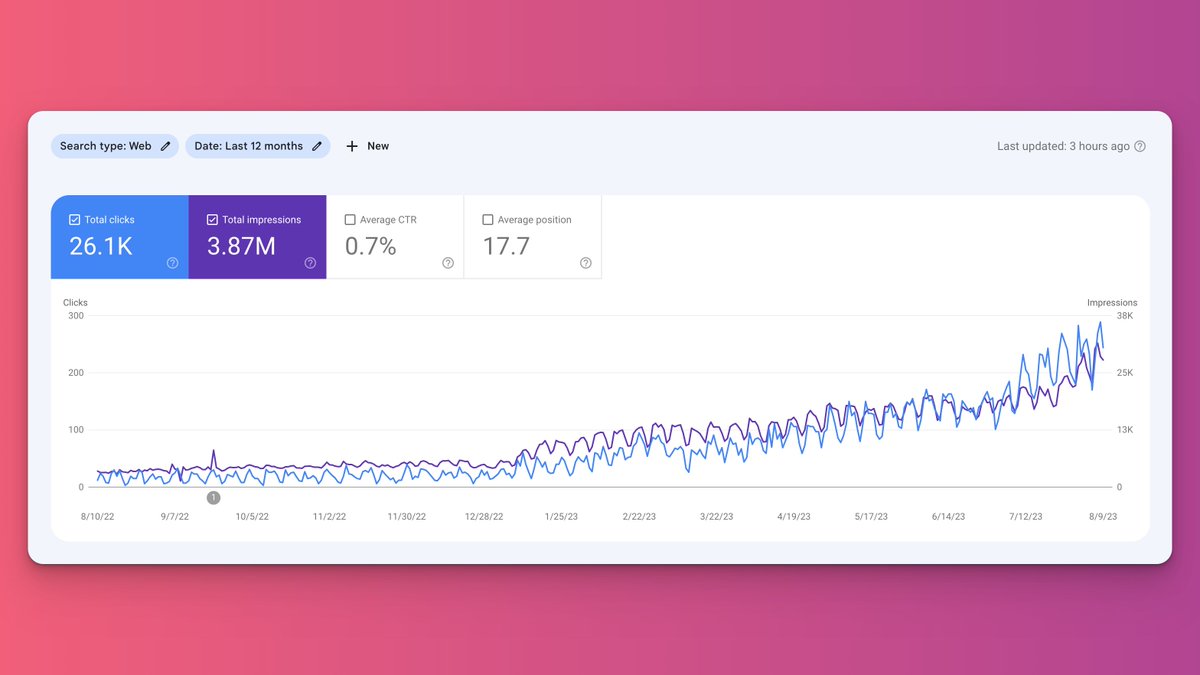
1. Targeting Keywords that are Too Competitive
I see this issue ALL THE TIME with brands we bring on that used another SEO agency in the past.
The previous SEO agency was creating content and building links...
But they were targeting keywords that were too competitive!
I see this issue ALL THE TIME with brands we bring on that used another SEO agency in the past.
The previous SEO agency was creating content and building links...
But they were targeting keywords that were too competitive!
Targeting keywords that are too competitive is both a waste of time and resources.
The hard truth is you won't be able to rank for a lot of keywords.
Would I love to be able to rank for the keyword "dining table"?
Of course!
But something like that just isn't in the cards.
The hard truth is you won't be able to rank for a lot of keywords.
Would I love to be able to rank for the keyword "dining table"?
Of course!
But something like that just isn't in the cards.
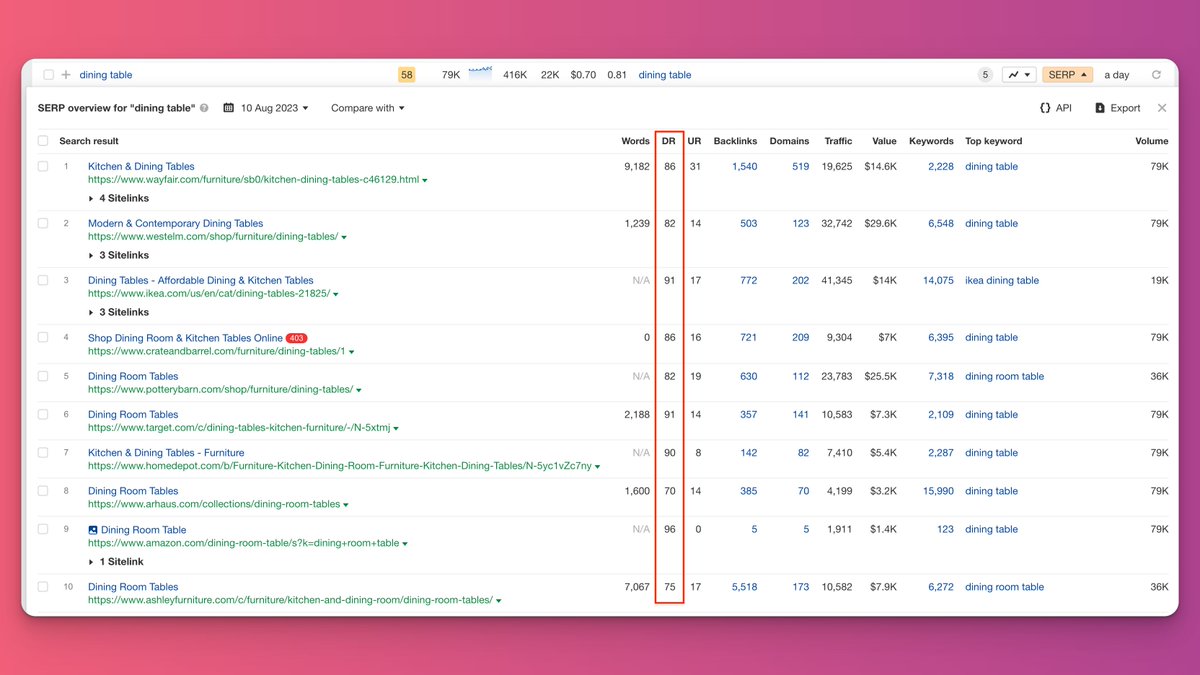
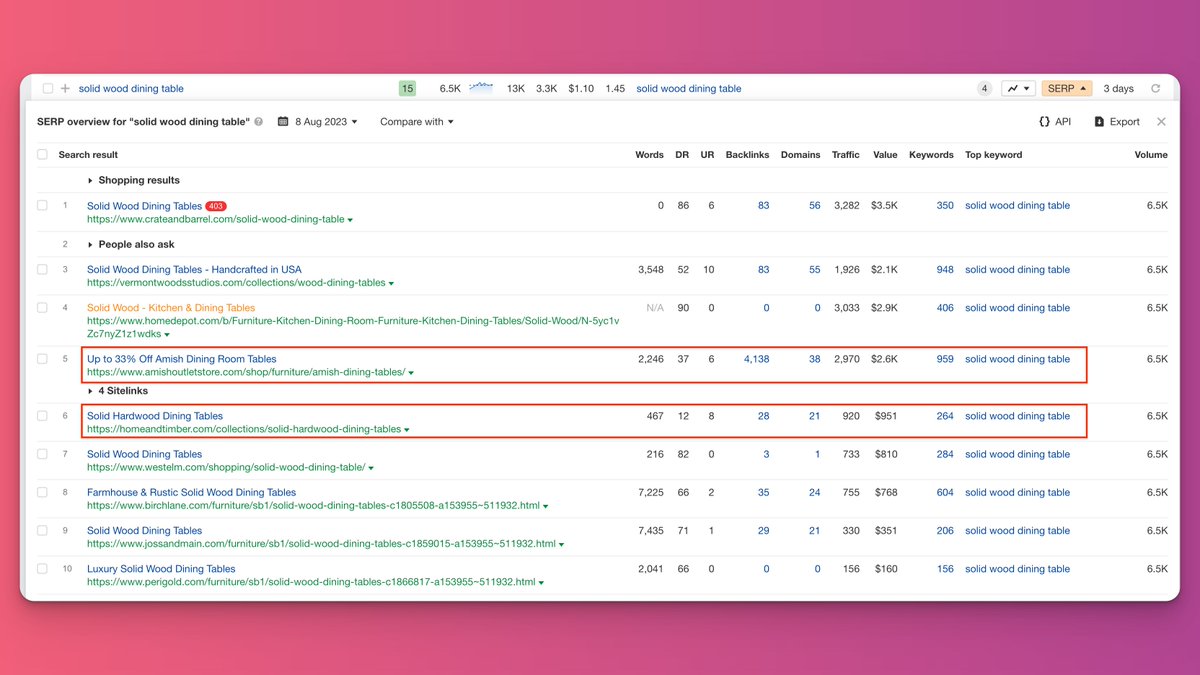
You need to look for long-tail keywords that have low DR sites ranking for them.
These are the keyword opportunities you can dominate and pull significant search traffic from.
Would you rather be #25 for "dining table" or #4 for the keyword "solid wood dining table"?
Exactly.
These are the keyword opportunities you can dominate and pull significant search traffic from.
Would you rather be #25 for "dining table" or #4 for the keyword "solid wood dining table"?
Exactly.
2. No Content on Collection Pages
Ranking Collection pages is the bread and butter of an eCommerce SEO campaign.
It's the only way your campaign is going to generate sales and ultimately result in a positive ROI.
Just ranking blog content isn't enough.
Ranking Collection pages is the bread and butter of an eCommerce SEO campaign.
It's the only way your campaign is going to generate sales and ultimately result in a positive ROI.
Just ranking blog content isn't enough.
As Collection pages stand, they're just a list of Products.
It's really hard for Google to rank a page that doesn't have any content on them.
So...
It's extremely important that you add content to any Collection pages you're trying to rank.
It's really hard for Google to rank a page that doesn't have any content on them.
So...
It's extremely important that you add content to any Collection pages you're trying to rank.
I try to add around 500 words of content to each Collection page I'm actively trying to rank for a keyword.
Bonus points if you add internal links to other relevant Collection pages within that content.
You'll see your keyword rankings soar!
Bonus points if you add internal links to other relevant Collection pages within that content.
You'll see your keyword rankings soar!
3. Poor Blog Strategy
Most brands I start working with don't have a blog strategy.
The ones who do usually have a ton of low-quality blog posts ranging from 200-300 words that don't rank in Google or generate any organic traffic.
Both will hurt your SEO.
Most brands I start working with don't have a blog strategy.
The ones who do usually have a ton of low-quality blog posts ranging from 200-300 words that don't rank in Google or generate any organic traffic.
Both will hurt your SEO.
If you want to rank well in Google, you NEED a blog strategy.
Blog content helps to build the topical authority of your site, which in turn helps your Product and Collection pages rank in Google and generate revenue for your business.
Blog content helps to build the topical authority of your site, which in turn helps your Product and Collection pages rank in Google and generate revenue for your business.
I often get asked how many blog posts to publish each month.
There is no magic number.
How many QUALITY blog posts can you publish each month?
That's the number, whether it be 1 or 20.
Focus on making each blog post the best piece of content on the web for its topic.
There is no magic number.
How many QUALITY blog posts can you publish each month?
That's the number, whether it be 1 or 20.
Focus on making each blog post the best piece of content on the web for its topic.
4. Copy and Pasted Product Descriptions
I can't tell you how many times I see brands just copy and paste their product descriptions from the manufacturer's website.
This is a big no-no in the eyes of Google.
Google HATES duplicate content.
It will get your website penalized.
I can't tell you how many times I see brands just copy and paste their product descriptions from the manufacturer's website.
This is a big no-no in the eyes of Google.
Google HATES duplicate content.
It will get your website penalized.
Each of your products should have a unique product description that really sells users on why they should purchase from you.
Even if you have different SKU's of the same product, each SKU should have its own, unique product description.
Even if you have different SKU's of the same product, each SKU should have its own, unique product description.
This can be tedious, especially if you have hundreds of different products.
But it's really not worth risking and getting in trouble with Google.
I've had clients ignore this warning before and they're fine in the short-term.
But it always bites them in the long run.
But it's really not worth risking and getting in trouble with Google.
I've had clients ignore this warning before and they're fine in the short-term.
But it always bites them in the long run.
5. Canonicalize Paginated Pages
When you have a lot of Products and/or Blog Posts, you're going to create a TON of paginated pages.
You'll see pages like:
/collections/solid-wood-dining-tables?page=4
/blogs/news?page=5
... being indexed in Google.
And this hurts SEO.
When you have a lot of Products and/or Blog Posts, you're going to create a TON of paginated pages.
You'll see pages like:
/collections/solid-wood-dining-tables?page=4
/blogs/news?page=5
... being indexed in Google.
And this hurts SEO.
Why?
You're filling Google's search results with garbage!
Not to mention, there's a chance those pages could get your website flagged for having duplicate content.
It's just bad signals for Google.
You need to get rid of them.
But how?
You're filling Google's search results with garbage!
Not to mention, there's a chance those pages could get your website flagged for having duplicate content.
It's just bad signals for Google.
You need to get rid of them.
But how?
If you edit Shopify's themes.liquid file, you can add code that will add a canonical tag to all of these paginated pages that point to the page's "root" page.
For example:
The page: /blogs/news?page=5 should have a canonical tag pointing to the page: /blogs/news
For example:
The page: /blogs/news?page=5 should have a canonical tag pointing to the page: /blogs/news
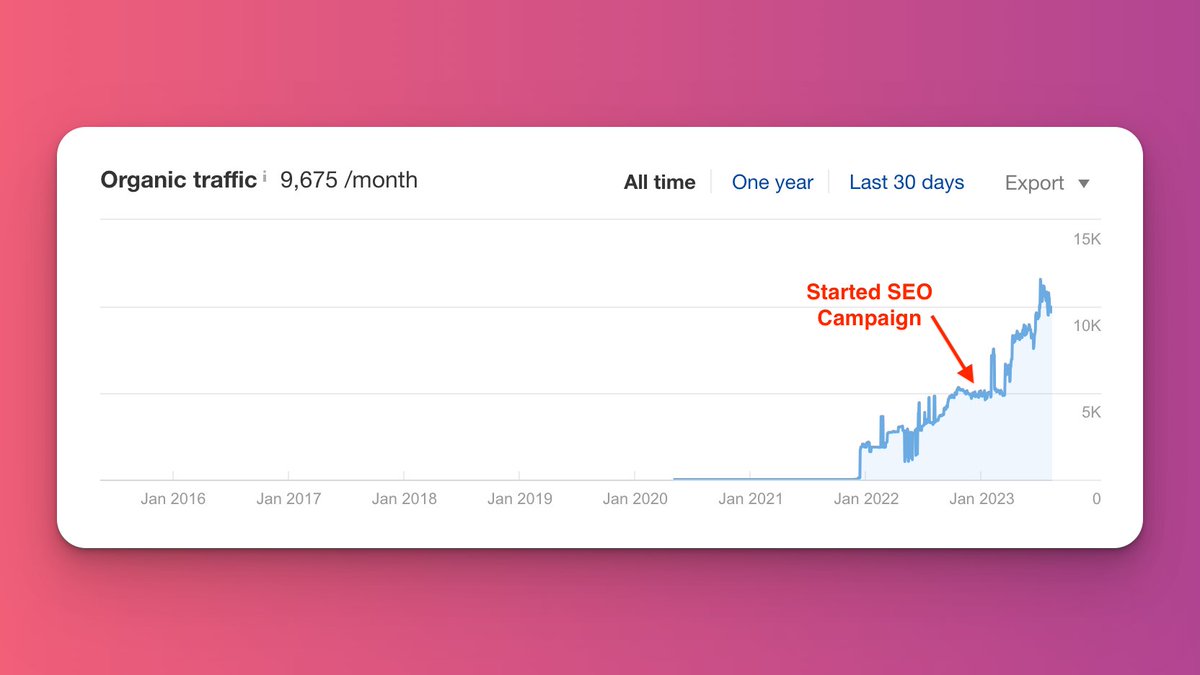
I implement these five practices for all of the Shopify brands I run SEO for, and it absolutely works wonders!
They're proven techniques to skyrocket keyword rankings, organic traffic, and organic revenue in 6-months.
They're proven techniques to skyrocket keyword rankings, organic traffic, and organic revenue in 6-months.
Tired of trying to figure out SEO on your own?
If you're interested in having me take on the SEO of your eCommerce brand, book a free consultation call with me here:
inboundpursuit.com
If you're interested in having me take on the SEO of your eCommerce brand, book a free consultation call with me here:
inboundpursuit.com
Loading suggestions...