

ChatGPT doesn't support file uploads.
But don’t worry, this new AI tool can.
Here's how to use it and save you valuable time:
[Bookmark now or miss the boat]
But don’t worry, this new AI tool can.
Here's how to use it and save you valuable time:
[Bookmark now or miss the boat]
Step 1: Go to ChatDoc .com
→ Upload any kind of document (pdf, word, scans, markdown, epub, txt, website url and more
→ After submitting the document, you'll get 5 related questions.
→ Upload any kind of document (pdf, word, scans, markdown, epub, txt, website url and more
→ After submitting the document, you'll get 5 related questions.

Step 2: Chat with your document.
→ Ask your file, get the info you need.
→ Select texts / tables, receive AI analysis.
→ Start a thread, uncover deeper knowledge.
→ Query across docs, turbocharge research.
→ Ask your file, get the info you need.
→ Select texts / tables, receive AI analysis.
→ Start a thread, uncover deeper knowledge.
→ Query across docs, turbocharge research.

Step 3: Follow-up questions
→ Get a deep understanding of your documents by asking follow-up questions
→ Get a deep understanding of your documents by asking follow-up questions

Step 4: Multi-file support
→ Ask questions across multiple files.
→ Choose particular files for questioning within a collection.
→ Ask questions across multiple files.
→ Choose particular files for questioning within a collection.

Step 5: Ask in any language.
→ Ask or prompt in whatever language you speak—be it English, Spanish, Chinese, or any other.
→ Ask or prompt in whatever language you speak—be it English, Spanish, Chinese, or any other.

Step 6: ChatDOC is for everyone.
👩🎓 Students
🔬 Researchers
👩⚖️ Lawyers
📊 Business Analysts
🔧 Presale Engineers
👩🎓 Students
🔬 Researchers
👩⚖️ Lawyers
📊 Business Analysts
🔧 Presale Engineers
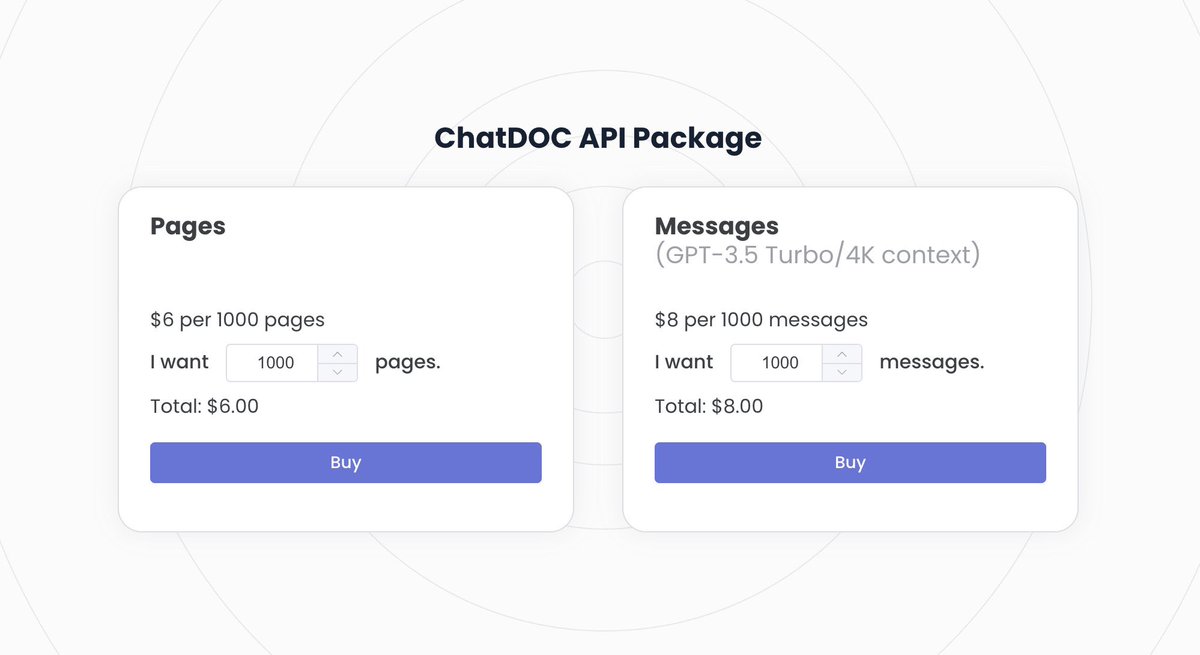
Step 7: ChatDOC's API offers features like:
→ Extracting accurate data from any file.
→ Showing the original files alongside the chatbot.
→ Tracing AI responses to specific document sections.
→ Custom-building your own chatbots today.
chatdoc.com
→ Extracting accurate data from any file.
→ Showing the original files alongside the chatbot.
→ Tracing AI responses to specific document sections.
→ Custom-building your own chatbots today.
chatdoc.com

Loading suggestions...