

DAY 5 of #20DaysOfReact
Topics Covered :
Hooks
What are Hooks?
Hooks in React are like special tools that make it easier for components (the building blocks of React applications) to do things like remembering information, doing tasks at the right time, and sharing data with other parts of the app.
Hooks let us use different React features from our components. we can either use the built-in Hooks or combine them to build your own(custom hooks).
There are different kind of hooks:
- State Hooks
- Context Hooks
- Ref Hooks
- Effect Hooks
- Resource Hooks
- Performance Hooks
- Your own custom hooks.
State Hooks
Think of "state" in a component like a sticky note or a piece of paper that the component can use to remember important information. For instance, if you have a form on a website, the sticky note can hold the text you type into the form fields. If you have a gallery of pictures, the sticky note can remember which picture you've selected to display. It's a way for the component to keep track of what's happening or what the user has done.
To add state to a component, we can use:
useState - declares a state variable that you can update directly.
useReducer -declares a state variable with the update logic inside a reducer function.
Context Hooks
Think of "context" as a messenger that allows a component to get information from its parent, even if there are many layers of other components in between.
For example, imagine your top-level component has information about the current style or theme of your app, like whether it's light or dark mode. Instead of passing this information as a prop through all the intermediate components, you can use context to send this message directly to the component that needs it, even if it's far down the component tree. It's like a shortcut for sharing important data without making a long chain of deliveries through props.
useContext - reads and subscribes to a context.
Ref Hooks
Think of "refs" as a way for a component to have a secret note that it keeps hidden, which contains some information it doesn't want to show on the screen. This information could be something like a reference to a specific part of a web page (like a button), or a timer that the component is using.
Unlike the regular information a component uses (which makes it update and change), this secret note (the ref) doesn't make the component change or re-render when you update it. It's like a special tool you can use when you need to work with parts of your app that don't follow the usual rules of React, like certain browser features.
In a way, refs are like a hidden escape route from the usual React way of doing things, allowing you to interact with the outside world when necessary, without causing your component to refresh or redraw.
useRef -declares a ref. You can hold any value in it, but most often it’s used to hold a DOM node.
Effect Hooks
"Effects" are like connectors that help a component talk to and work smoothly with things outside of its own world. These can be things like the internet (network), elements on a web page (browser DOM), animations, or even parts of your app that use a different set of rules for how they work (like widgets from a different user interface library).
So, when you want your component to interact with these external things, you use effects. They allow your component to understand and work together with the outside world, whether it's fetching data from the internet, animating elements, or making sense of non-React code. Effects help your component synchronize with these external systems, making your app more dynamic and responsive.
useEffect - connects a component to an external system.
eg:
UseState Hook
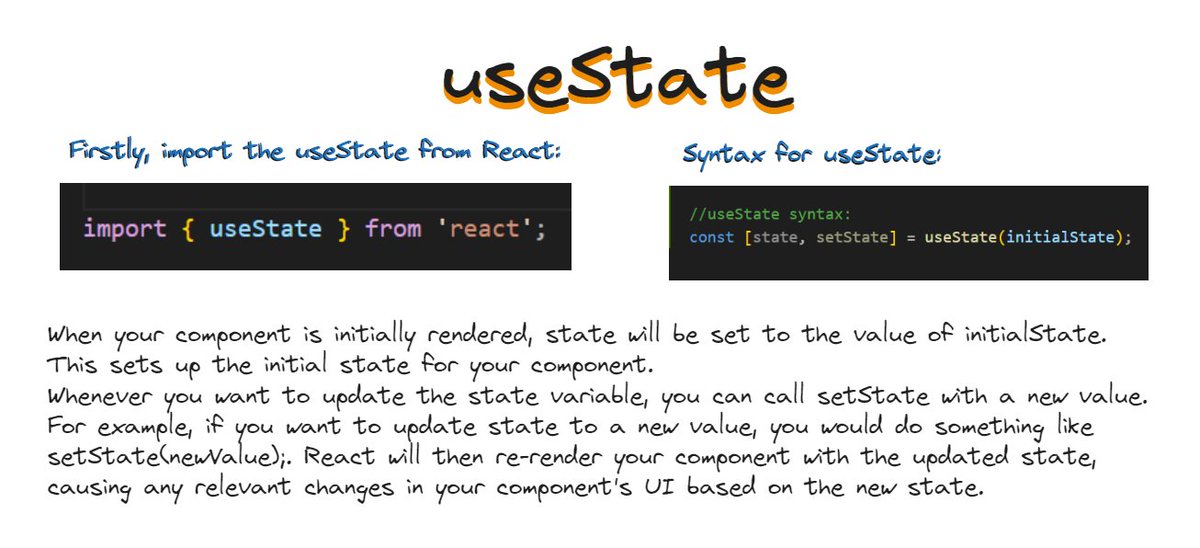
useState is a built-in React Hook that lets you add a state variable to your component.
Usage of useState:
1. Adding State to a Component:
- Employ useState to introduce and manage state within your component.
2. Updating State Based on the Previous State:
- Utilize the previous state value to calculate and set the new state, ensuring accurate updates.
3. Updating Objects and Arrays in State:
- Manage complex state structures like objects or arrays, modifying specific elements as needed.
4. Avoiding Recreating the Initial State:
- Prevent unintentional state resets by using the functional update form to build upon the existing state.
5. Resetting State with a Key:
- Implement state resets by using a unique key or identifier to revert to initial values.
6. Storing Information from Previous Renders:
- Capture and retain information from previous render cycles, enabling data persistence and comparison.
useEffect Hook
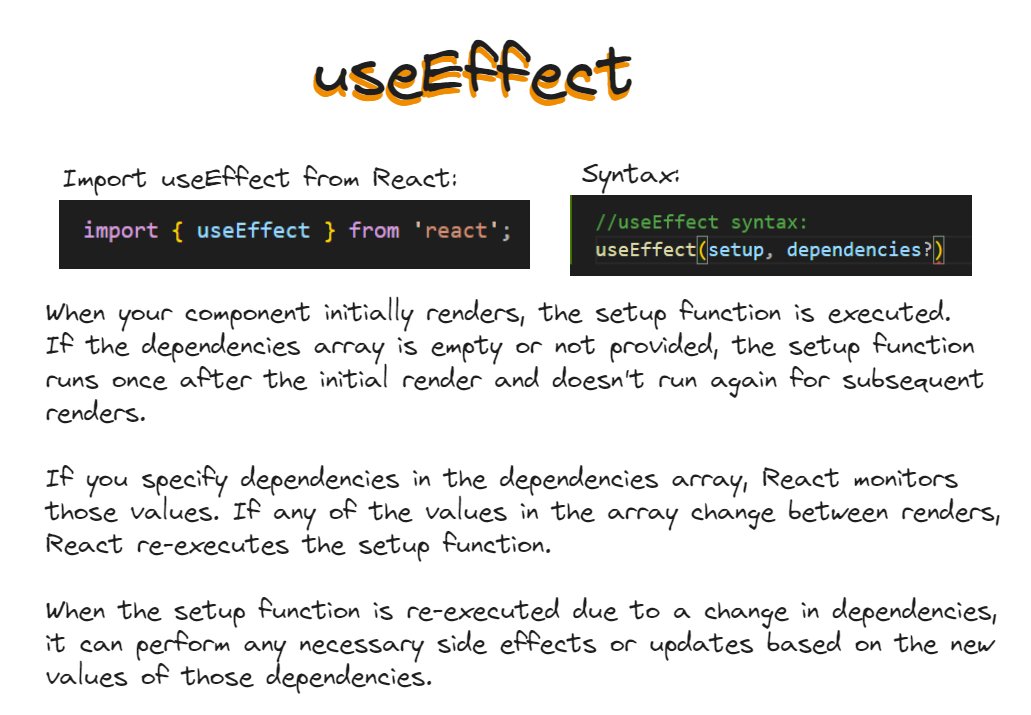
useEffect is a built-in react hook that lets you synchronize a component with an external system.
Usage of useEffect:
1. Connecting to External Systems:
- Use useEffect to interact with external systems like APIs or databases.
2. Custom Hooks for Effects:
- Create custom hooks to encapsulate and reuse useEffect logic.
3. Non-React Widget Control:
- Manage non-React components or widgets within your React app using useEffect.
4. Data Fetching:
- Initiate data fetching operations with useEffect to retrieve and display data.
5. Reactive Dependencies:
- Specify dependencies in useEffect to trigger effects when specific values change.
6. Updating State Sequentially:
- Update state within useEffect based on previous state for sequential operations.
7. Optimizing Object Dependencies:
- Efficiently manage dependencies in useEffect to avoid unnecessary updates.
Topics Covered :
Hooks
What are Hooks?
Hooks in React are like special tools that make it easier for components (the building blocks of React applications) to do things like remembering information, doing tasks at the right time, and sharing data with other parts of the app.
Hooks let us use different React features from our components. we can either use the built-in Hooks or combine them to build your own(custom hooks).
There are different kind of hooks:
- State Hooks
- Context Hooks
- Ref Hooks
- Effect Hooks
- Resource Hooks
- Performance Hooks
- Your own custom hooks.
State Hooks
Think of "state" in a component like a sticky note or a piece of paper that the component can use to remember important information. For instance, if you have a form on a website, the sticky note can hold the text you type into the form fields. If you have a gallery of pictures, the sticky note can remember which picture you've selected to display. It's a way for the component to keep track of what's happening or what the user has done.
To add state to a component, we can use:
useState - declares a state variable that you can update directly.
useReducer -declares a state variable with the update logic inside a reducer function.
Context Hooks
Think of "context" as a messenger that allows a component to get information from its parent, even if there are many layers of other components in between.
For example, imagine your top-level component has information about the current style or theme of your app, like whether it's light or dark mode. Instead of passing this information as a prop through all the intermediate components, you can use context to send this message directly to the component that needs it, even if it's far down the component tree. It's like a shortcut for sharing important data without making a long chain of deliveries through props.
useContext - reads and subscribes to a context.
Ref Hooks
Think of "refs" as a way for a component to have a secret note that it keeps hidden, which contains some information it doesn't want to show on the screen. This information could be something like a reference to a specific part of a web page (like a button), or a timer that the component is using.
Unlike the regular information a component uses (which makes it update and change), this secret note (the ref) doesn't make the component change or re-render when you update it. It's like a special tool you can use when you need to work with parts of your app that don't follow the usual rules of React, like certain browser features.
In a way, refs are like a hidden escape route from the usual React way of doing things, allowing you to interact with the outside world when necessary, without causing your component to refresh or redraw.
useRef -declares a ref. You can hold any value in it, but most often it’s used to hold a DOM node.
Effect Hooks
"Effects" are like connectors that help a component talk to and work smoothly with things outside of its own world. These can be things like the internet (network), elements on a web page (browser DOM), animations, or even parts of your app that use a different set of rules for how they work (like widgets from a different user interface library).
So, when you want your component to interact with these external things, you use effects. They allow your component to understand and work together with the outside world, whether it's fetching data from the internet, animating elements, or making sense of non-React code. Effects help your component synchronize with these external systems, making your app more dynamic and responsive.
useEffect - connects a component to an external system.
eg:
UseState Hook
useState is a built-in React Hook that lets you add a state variable to your component.
Usage of useState:
1. Adding State to a Component:
- Employ useState to introduce and manage state within your component.
2. Updating State Based on the Previous State:
- Utilize the previous state value to calculate and set the new state, ensuring accurate updates.
3. Updating Objects and Arrays in State:
- Manage complex state structures like objects or arrays, modifying specific elements as needed.
4. Avoiding Recreating the Initial State:
- Prevent unintentional state resets by using the functional update form to build upon the existing state.
5. Resetting State with a Key:
- Implement state resets by using a unique key or identifier to revert to initial values.
6. Storing Information from Previous Renders:
- Capture and retain information from previous render cycles, enabling data persistence and comparison.
useEffect Hook
useEffect is a built-in react hook that lets you synchronize a component with an external system.
Usage of useEffect:
1. Connecting to External Systems:
- Use useEffect to interact with external systems like APIs or databases.
2. Custom Hooks for Effects:
- Create custom hooks to encapsulate and reuse useEffect logic.
3. Non-React Widget Control:
- Manage non-React components or widgets within your React app using useEffect.
4. Data Fetching:
- Initiate data fetching operations with useEffect to retrieve and display data.
5. Reactive Dependencies:
- Specify dependencies in useEffect to trigger effects when specific values change.
6. Updating State Sequentially:
- Update state within useEffect based on previous state for sequential operations.
7. Optimizing Object Dependencies:
- Efficiently manage dependencies in useEffect to avoid unnecessary updates.
Custom Hooks:
There are so many built-in hooks in react, but still if you wish to create on for yourself you can using "Custom hooks".
You can make a custom hook by following these steps:
Start with a Function:
Begin by creating a regular JavaScript function. Custom hooks should have names that start with "use" to adhere to the hook naming convention.
Define the Hook:
Inside your custom hook function, you can use built-in hooks or other custom hooks if needed. These hooks can include useState, useEffect, or other custom hooks you've created.
Encapsulate Logic:
Identify the logic you want to encapsulate and abstract into the custom hook. This logic can involve state management, data fetching, event handling, or any other functionality you want to reuse across components.
Return Values:
Your custom hook should return values that components can use. Typically, this includes variables, functions, or both, depending on the functionality of your hook.
Use the Custom Hook:
Import and use the custom hook in your components, just like you would with built-in hooks. This allows you to reuse the encapsulated logic across different parts of your application.
Custom hooks are a powerful tool in the React developer's toolkit. They enable you to encapsulate and share stateful logic, promoting reusability and maintainability in your codebase. By creating custom hooks, you can streamline your components, separate concerns, and write cleaner, more efficient code.
There are so many built-in hooks in react, but still if you wish to create on for yourself you can using "Custom hooks".
You can make a custom hook by following these steps:
Start with a Function:
Begin by creating a regular JavaScript function. Custom hooks should have names that start with "use" to adhere to the hook naming convention.
Define the Hook:
Inside your custom hook function, you can use built-in hooks or other custom hooks if needed. These hooks can include useState, useEffect, or other custom hooks you've created.
Encapsulate Logic:
Identify the logic you want to encapsulate and abstract into the custom hook. This logic can involve state management, data fetching, event handling, or any other functionality you want to reuse across components.
Return Values:
Your custom hook should return values that components can use. Typically, this includes variables, functions, or both, depending on the functionality of your hook.
Use the Custom Hook:
Import and use the custom hook in your components, just like you would with built-in hooks. This allows you to reuse the encapsulated logic across different parts of your application.
Custom hooks are a powerful tool in the React developer's toolkit. They enable you to encapsulate and share stateful logic, promoting reusability and maintainability in your codebase. By creating custom hooks, you can streamline your components, separate concerns, and write cleaner, more efficient code.
That's it for Day 5. Tomorrow we will explore Routing with react router.
Stay tuned and Happy coding! 🚀
Stay tuned and Happy coding! 🚀
Loading suggestions...