

🐍 Python Tip:
Use the `subprocess` module for executing shell commands and capturing their output 🚀
Use the `subprocess` module for executing shell commands and capturing their output 🚀
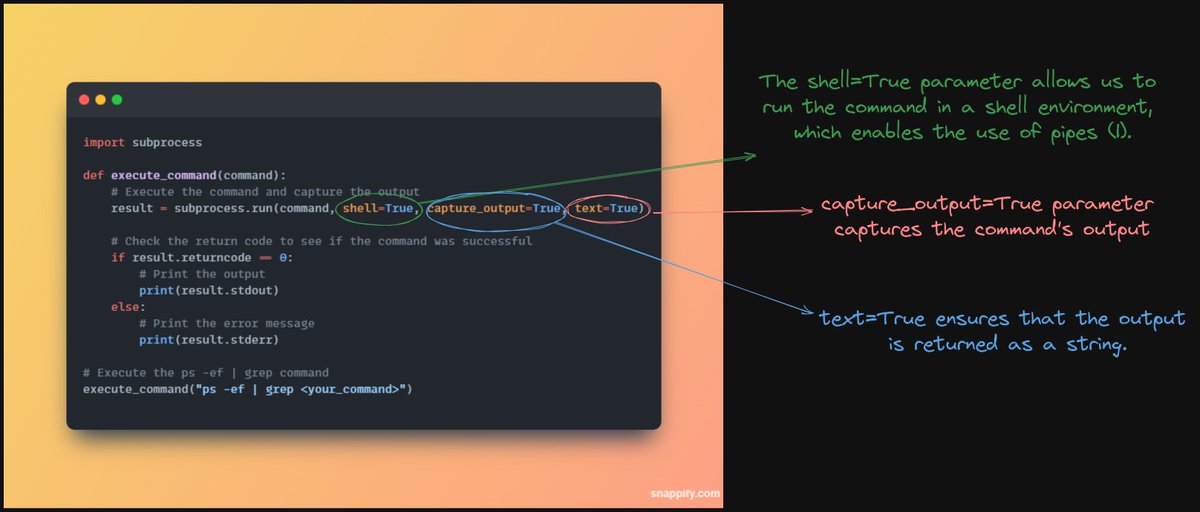
1️⃣ `subprocess.run()` makes it easy to run shell commands from your Python script.
2️⃣ Capture command output with `capture_output=True` and get it as a string with `text=True`.
3️⃣ Check the return code to see if the command was successful: `result.returncode`.
2️⃣ Capture command output with `capture_output=True` and get it as a string with `text=True`.
3️⃣ Check the return code to see if the command was successful: `result.returncode`.
4️⃣ Handle success: Print captured output using `result.stdout`.
5️⃣ Handle failure: Print error message using `result.stderr`
6️⃣ Remember to sanitize user input when using `shell=True` to avoid security risks.
5️⃣ Handle failure: Print error message using `result.stderr`
6️⃣ Remember to sanitize user input when using `shell=True` to avoid security risks.
Hello 👋
I am Jaydeep from India 🇮🇳
Full time Software Engineer & part time content creator on
🐦Twitter
🖧 Linkedin
🎥YouTube
Follow me for content on
🐍 Python
🤖Ai/ML
🎨Data Visualization
🌟Content creation
Subscribe To My YouTube🔽
youtu.be
I am Jaydeep from India 🇮🇳
Full time Software Engineer & part time content creator on
🎥YouTube
Follow me for content on
🐍 Python
🤖Ai/ML
🎨Data Visualization
🌟Content creation
Subscribe To My YouTube🔽
youtu.be
Loading suggestions...