

Time for a summary of this article, although a summary is not a replacement for a full article. Here we go:
CPU vs GPU:
CPUs have been optimized for executing sequential instructions as fast as possible. A lot of chip area goes towards reducing latency, such as large caches, more control units and less ALUs (compute).
GPUs on the other hand are optimized for throughput, i.e., even if their instruction latency is high, they can execute many of them in parallel resulting in high throughput. A lot chip area is used for large number of compute units.
GPU Compute Architecutre
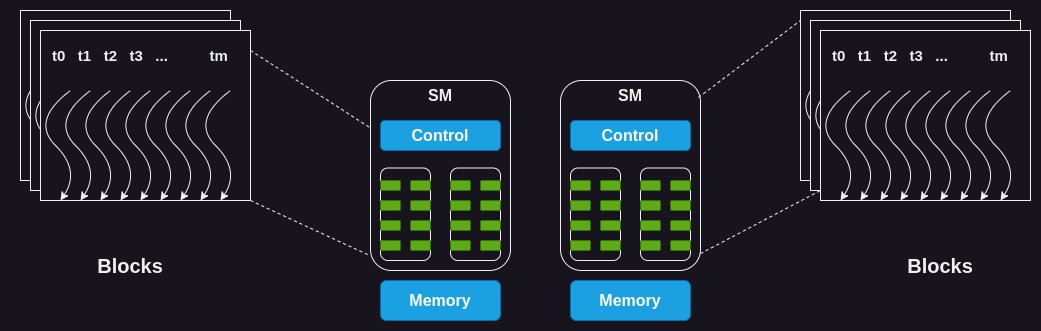
GPUs consist of several streaming multiprocessors (SM). Each SM consists of a large number of cores. For example the H100 has 132 SMs with 64 cores per SM.
GPU Memory Architecture
There are several different kinds of memories in the GPU.
- Registers: Each SM has a large number of registers which are shared between cores. For instance, the H100 has 65,536 registers per SM.
- Shared Memory: Each SM has a small amount of fast SRAM based scratchpad memory which is shared between cores. The threads can use it load and share data between them to cut down redundant reads from the global memory.
- L2 Cache: Each SM also has an L2 cache
- L1 Cache: There is an off-chip L1 cache. Both L1 and L2 caches work similar to how L1/L2 caches work in CPUs
- Global Memory: Finally there is an off-chip high bandwidth memory (HBM) called global memory. This is where most of the data lives and loaded by threads into other memories as needed. The H100 has an 80 GB HBM with 3000 GB/s bandwidth.
Execution of a Kernel on the GPU
A kernel is a piece of code designed for execution on the GPU. Typically any computation which operates on massive amounts of data and which can exploit parallelism is suitable for execution on the GPU. Linear algebra operations such as matrix multiplication are prime examples of this.
The following steps are involved behind the execution of a kernel on the GPU
First, the data required for the computation is copied from the CPU (host) memory to the GPU (device) memory. In some cases, the GPU can directly read from host memory using unified virtual memory as well.
Each kernel needs to launch a certain number of threads for its execution. This set of threads is called a grid which is arranged in the form of one or more blocks, where each block consists of one or more threads.
The GPU needs to assign each block to an SM for execution. All the threads within a block are assigned to an SM simultaneously for execution. For this, the GPU needs to reserve resources (such as registers, shared memory, cores) on the SM before it can let the SM execute the threads.
However, there is another level of division of threads during execution on the SM. The threads are grouped in sizes of 32, which is called a warp. The SM executes the threads within a warp using the single instruction multiple threads (SIMT) model. Which means that it issues the same instructions to all the threads which is executed by them at the same time. However, each thread in the warp operates on different parts of the data, thus achieving parallelism. If you are familiar with SIMD instruction on CPU, this is similar to that.
Note that the SM is typically issuing instructions for several warps at the same time based on how much compute it has available. Also, if a warp is waiting for the results of an instruction, the SM puts that warp in sleep and executes another warp which is not waiting for anything.
Resource Partitioning and Occupancy
The resource utilization of an SM is measured by a metric called occupancy which is referred to as the ratio of the number of warps assigned to it, to the maximum number of warps it can handle.
The SM has a fixed set of execution resources, including registers, shared memory, thread block slots, and thread slots. These resources are dynamically divided among threads based on their requirements and the GPU's limits. For example, on the Nvidia H100, each SM can handle 32 blocks, 64 warps (i.e., 2048 threads), and 1024 threads per block.
Let's look at an example to see how resource allocation can affect the occupancy of an SM. If we use a block size of 32 threads and need a total of 2048 threads, we'll have 64 of these blocks. However, each SM can only handle 32 blocks at once. So, even though the SM can run 2048 threads, it will only be running 1024 threads at a time, resulting in a 50% occupancy rate.
The challenge with suboptimal occupancy is that it may not provide the necessary tolerance for latency or the required compute throughput to reach the hardware’s peak performance.
Notes:
This is a summary of the full article I wrote. I may have missed or excluded several details.
Figures:
- The first figure is from the Nvidia C++ CUDA Programming guide
- The 3rd figure (GPU memory architecture) is from the Cornell Virtual Workshop on GPUs
- The 2nd and 4th figures are my own drawing but based on the book "Programming Massively Parallel Processors".
CPU vs GPU:
CPUs have been optimized for executing sequential instructions as fast as possible. A lot of chip area goes towards reducing latency, such as large caches, more control units and less ALUs (compute).
GPUs on the other hand are optimized for throughput, i.e., even if their instruction latency is high, they can execute many of them in parallel resulting in high throughput. A lot chip area is used for large number of compute units.
GPU Compute Architecutre
GPUs consist of several streaming multiprocessors (SM). Each SM consists of a large number of cores. For example the H100 has 132 SMs with 64 cores per SM.
GPU Memory Architecture
There are several different kinds of memories in the GPU.
- Registers: Each SM has a large number of registers which are shared between cores. For instance, the H100 has 65,536 registers per SM.
- Shared Memory: Each SM has a small amount of fast SRAM based scratchpad memory which is shared between cores. The threads can use it load and share data between them to cut down redundant reads from the global memory.
- L2 Cache: Each SM also has an L2 cache
- L1 Cache: There is an off-chip L1 cache. Both L1 and L2 caches work similar to how L1/L2 caches work in CPUs
- Global Memory: Finally there is an off-chip high bandwidth memory (HBM) called global memory. This is where most of the data lives and loaded by threads into other memories as needed. The H100 has an 80 GB HBM with 3000 GB/s bandwidth.
Execution of a Kernel on the GPU
A kernel is a piece of code designed for execution on the GPU. Typically any computation which operates on massive amounts of data and which can exploit parallelism is suitable for execution on the GPU. Linear algebra operations such as matrix multiplication are prime examples of this.
The following steps are involved behind the execution of a kernel on the GPU
First, the data required for the computation is copied from the CPU (host) memory to the GPU (device) memory. In some cases, the GPU can directly read from host memory using unified virtual memory as well.
Each kernel needs to launch a certain number of threads for its execution. This set of threads is called a grid which is arranged in the form of one or more blocks, where each block consists of one or more threads.
The GPU needs to assign each block to an SM for execution. All the threads within a block are assigned to an SM simultaneously for execution. For this, the GPU needs to reserve resources (such as registers, shared memory, cores) on the SM before it can let the SM execute the threads.
However, there is another level of division of threads during execution on the SM. The threads are grouped in sizes of 32, which is called a warp. The SM executes the threads within a warp using the single instruction multiple threads (SIMT) model. Which means that it issues the same instructions to all the threads which is executed by them at the same time. However, each thread in the warp operates on different parts of the data, thus achieving parallelism. If you are familiar with SIMD instruction on CPU, this is similar to that.
Note that the SM is typically issuing instructions for several warps at the same time based on how much compute it has available. Also, if a warp is waiting for the results of an instruction, the SM puts that warp in sleep and executes another warp which is not waiting for anything.
Resource Partitioning and Occupancy
The resource utilization of an SM is measured by a metric called occupancy which is referred to as the ratio of the number of warps assigned to it, to the maximum number of warps it can handle.
The SM has a fixed set of execution resources, including registers, shared memory, thread block slots, and thread slots. These resources are dynamically divided among threads based on their requirements and the GPU's limits. For example, on the Nvidia H100, each SM can handle 32 blocks, 64 warps (i.e., 2048 threads), and 1024 threads per block.
Let's look at an example to see how resource allocation can affect the occupancy of an SM. If we use a block size of 32 threads and need a total of 2048 threads, we'll have 64 of these blocks. However, each SM can only handle 32 blocks at once. So, even though the SM can run 2048 threads, it will only be running 1024 threads at a time, resulting in a 50% occupancy rate.
The challenge with suboptimal occupancy is that it may not provide the necessary tolerance for latency or the required compute throughput to reach the hardware’s peak performance.
Notes:
This is a summary of the full article I wrote. I may have missed or excluded several details.
Figures:
- The first figure is from the Nvidia C++ CUDA Programming guide
- The 3rd figure (GPU memory architecture) is from the Cornell Virtual Workshop on GPUs
- The 2nd and 4th figures are my own drawing but based on the book "Programming Massively Parallel Processors".



Loading suggestions...