

Say goodbye to confusing spreadsheets.
Introducing Julius AI: Your Personal Data Analyst
Here's how you can get the most out of your data:
[ Bookmark to use later 🧵]
Introducing Julius AI: Your Personal Data Analyst
Here's how you can get the most out of your data:
[ Bookmark to use later 🧵]

Julius AI serves as a personal data analyst, specializing in the interpretation, analysis, and visualization of structured data.
It supports all these data formats.
❯ Google Sheets
❯ Excel
❯ CSV files
Julius AI can save you hours when analyzing complex datasets.
It supports all these data formats.
❯ Google Sheets
❯ Excel
❯ CSV files
Julius AI can save you hours when analyzing complex datasets.

Steps to analyze your first Dataset:
Step 1: Sign Up for New Account
➔ Go to julius.ai and sign up for a new account for free.
➔ You can also sign up using your Google account.
Step 1: Sign Up for New Account
➔ Go to julius.ai and sign up for a new account for free.
➔ You can also sign up using your Google account.


Step 2: Uploading the File
➔ Go to the files option and click on choose file.
➔ Upload a file or paste a Google Sheet URL.
Once the file is uploaded, you're ready to analyze your file.
Let's try out some Use Cases of Julius AI.
➔ Go to the files option and click on choose file.
➔ Upload a file or paste a Google Sheet URL.
Once the file is uploaded, you're ready to analyze your file.
Let's try out some Use Cases of Julius AI.

1. Understanding Your Datasets
In cases where you don’t have a full understanding of your dataset and would like to know more about it, you can ask Julius to do it for you.
Prompt used: "Help me understand my dataset."
In cases where you don’t have a full understanding of your dataset and would like to know more about it, you can ask Julius to do it for you.
Prompt used: "Help me understand my dataset."

2. Making Visualizations
Julius AI can help you create stunning visualizations using your datasets.
Let’s say I would like to have a line chart of units sold over time.
Prompt used: "Using the SalesOrders sheet, create a line chart showing units sold over Time"
Julius AI can help you create stunning visualizations using your datasets.
Let’s say I would like to have a line chart of units sold over time.
Prompt used: "Using the SalesOrders sheet, create a line chart showing units sold over Time"

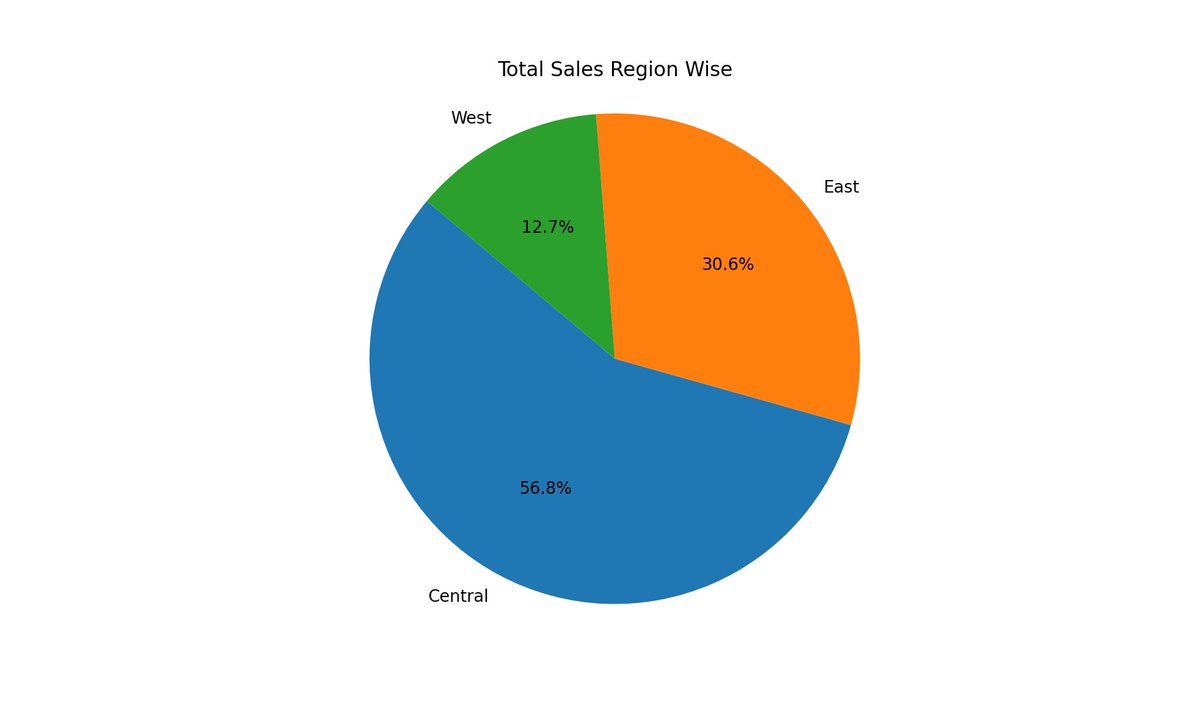
3. Text to Visual Diagrams.
You're able to ask the plugin to turn your data into visual diagrams.
- Bar plots
- Line plots
- Histograms
- Scatter plots
- Pie charts
Prompt used: "Draw a Pie chart for Total Sales region wise"
You're able to ask the plugin to turn your data into visual diagrams.
- Bar plots
- Line plots
- Histograms
- Scatter plots
- Pie charts
Prompt used: "Draw a Pie chart for Total Sales region wise"
4. Export Your Analyzed Data
Let Julius know you're ready to take your data with you.
→ Choose a name, select your format,
→ and a download link will appear right in the chat.
Prompt used: "Filter the Data for Central region and give me a csv"
Let Julius know you're ready to take your data with you.
→ Choose a name, select your format,
→ and a download link will appear right in the chat.
Prompt used: "Filter the Data for Central region and give me a csv"

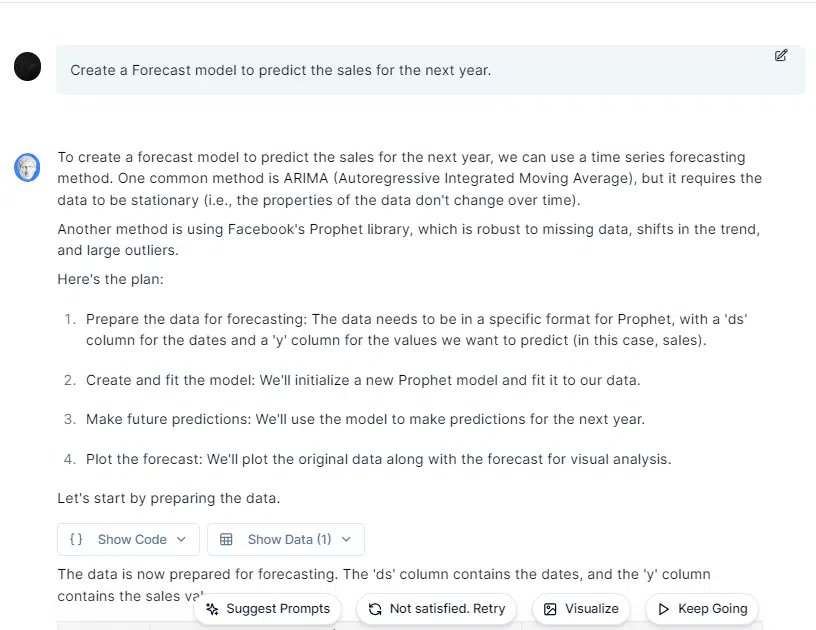
5. Creating Machine Learning Models
With Julius AI, you can create complex machine-learning models for predictions.
Prompt used: "Create a Forecast model to predict the sales for the next year"
With Julius AI, you can create complex machine-learning models for predictions.
Prompt used: "Create a Forecast model to predict the sales for the next year"
Save time and money with Julius AI, your personal data analyst.
Try it out yourself for free! 👇
julius.ai
Try it out yourself for free! 👇
julius.ai
Happy Learning! 💜
That's a wrap!
If you enjoyed this thread or found it useful:
1. Follow me @Kanojiyaaakash1 for more of these.
2. Retweet the first tweet to share this thread with your network.
That's a wrap!
If you enjoyed this thread or found it useful:
1. Follow me @Kanojiyaaakash1 for more of these.
2. Retweet the first tweet to share this thread with your network.
Loading suggestions...