

Top 50 Excel Tips for Shortcuts and Formulas
Save time and boost your efficiency with my tips!
Save time and boost your efficiency with my tips!
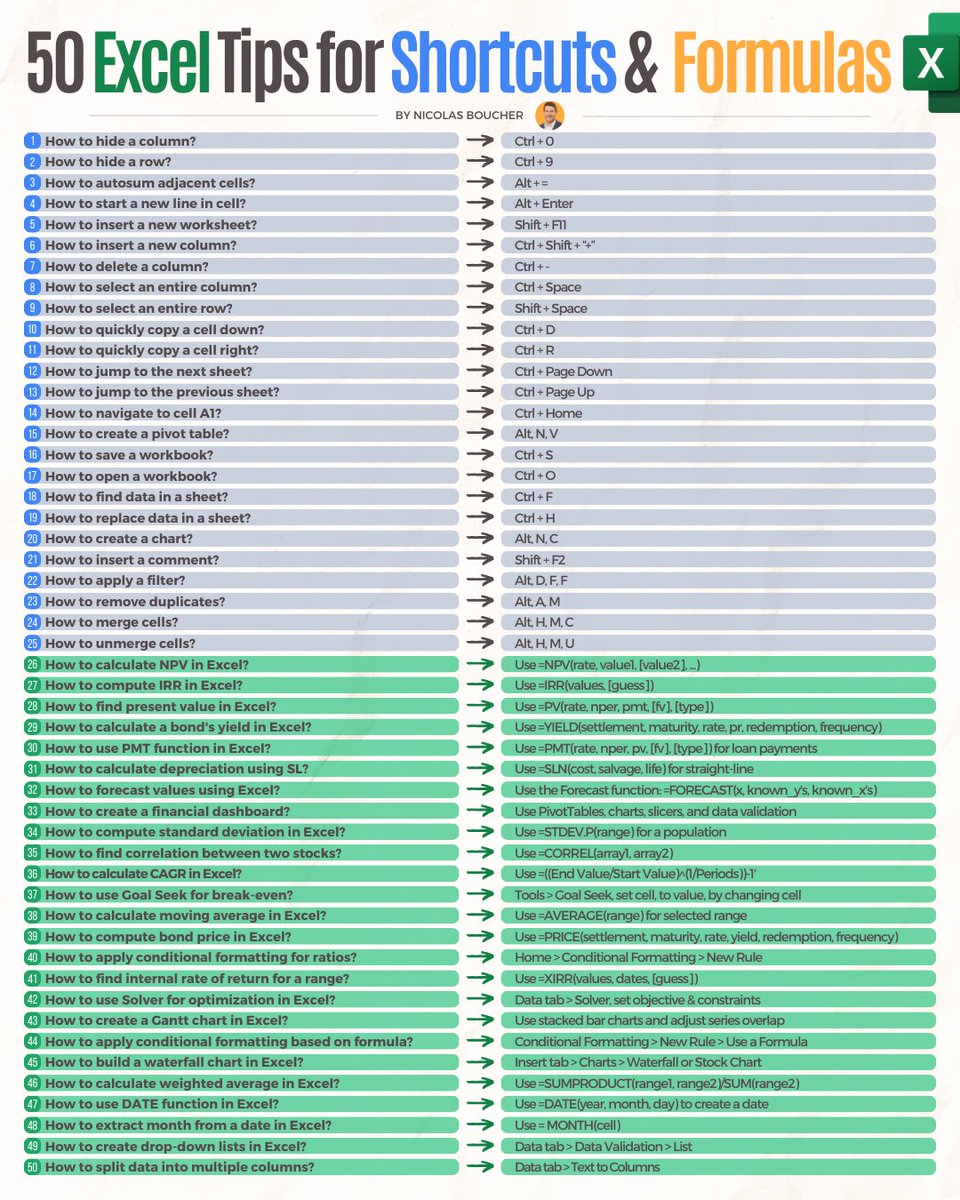
Part 1: Shortcuts
1. How to hide a column?
Tip: Ctrl + 0
1. How to hide a column?
Tip: Ctrl + 0
2. How to hide a row?
Tip: Ctrl + 9
Tip: Ctrl + 9
3. How to autosum adjacent cells?
Tip: Alt + =
Tip: Alt + =
4. How to start a new line in cell?
Tip: Alt + Enter
Tip: Alt + Enter
5. How to insert a new worksheet?
Tip: Shift + F11
Tip: Shift + F11
6. How to insert a new column?
Tip: Ctrl + Shift + “+”
Tip: Ctrl + Shift + “+”
7. How to delete a column?
Tip: Ctrl + -
Tip: Ctrl + -
8. How to select an entire column?
Tip: Ctrl + Space
Tip: Ctrl + Space
9. How to select an entire row?
Tip: Shift + Space
Tip: Shift + Space
10. How to quickly copy a cell down?
Tip: Ctrl + D
Tip: Ctrl + D
11. How to quickly copy a cell right?
Tip: Ctrl + R
Tip: Ctrl + R
12. How to jump to the next sheet?
Tip: Ctrl + Page Down
Tip: Ctrl + Page Down
13. How to jump to the previous sheet?
Tip: Ctrl + Page Up
Tip: Ctrl + Page Up
14. How to navigate to cell A1?
Tip: Ctrl + Home
Tip: Ctrl + Home
15. How to create a pivot table?
Tip: "Alt, N, V"
Tip: "Alt, N, V"
16. How to save a workbook?
Tip: Ctrl + S
Tip: Ctrl + S
17. How to open a workbook?
Tip: Ctrl + O
Tip: Ctrl + O
18. How to find data in a sheet?
Tip: Ctrl + F
Tip: Ctrl + F
19. How to replace data in a sheet?
Tip: Ctrl + H
Tip: Ctrl + H
20. How to create a chart?
Tip: "Alt, N, C"
Tip: "Alt, N, C"
21. How to insert a comment?
Tip: Shift + F2
Tip: Shift + F2
22. How to apply a filter?
Tip: "Alt, D, F, F"
Tip: "Alt, D, F, F"
23. How to remove duplicates?
Tip: "Alt, A, M"
Tip: "Alt, A, M"
24. How to merge cells?
Tip: "Alt, H, M, C"
Tip: "Alt, H, M, C"
25. How to unmerge cells?
Tip: "Alt, H, M, U"
Tip: "Alt, H, M, U"
Part 2: Formulas
26. How to sum a range of cells?
Tip: =SUM(range)
26. How to sum a range of cells?
Tip: =SUM(range)
27. How to find an average of numbers?
Tip: =AVERAGE(range)
Tip: =AVERAGE(range)
28. How to find the maximum value in a range?
Tip: =MAX(range)
Tip: =MAX(range)
29. How to find the minimum value in a range?
Tip: =MIN(range)
Tip: =MIN(range)
30. How to link cells from different sheets?
Tip: ='SheetName'!CellReference
Tip: ='SheetName'!CellReference
31. How to concatenate two text cells?
Tip: "=CONCATENATE(cell1, cell2) or cell1 & cell2"
Tip: "=CONCATENATE(cell1, cell2) or cell1 & cell2"
32. How to sum if cells meet a condition?
Tip: "=SUMIF(range, criteria, [sum_range])"
Tip: "=SUMIF(range, criteria, [sum_range])"
33. How to use INDEX to retrieve a value?
Tip: "=INDEX(range, row_num, [column_num])"
Tip: "=INDEX(range, row_num, [column_num])"
34. How to round a number to nearest integer?
Tip: "=ROUND(cell, 0)"
Tip: "=ROUND(cell, 0)"
35. How to extract left part of a text string?
Tip: "=LEFT(text, num_chars)"
Tip: "=LEFT(text, num_chars)"
36. How to extract right part of a text string?
Tip: "=RIGHT(text, num_chars)"
Tip: "=RIGHT(text, num_chars)"
37. How to use a VLOOKUP function?
Tip: "=VLOOKUP(lookup_value, table, col_index, [true/false])"
Tip: "=VLOOKUP(lookup_value, table, col_index, [true/false])"
38. How to use an HLOOKUP function?
Tip: "=HLOOKUP(lookup_value, table, row_index, [true/false])"
Tip: "=HLOOKUP(lookup_value, table, row_index, [true/false])"
39. How to calculate the square root?
Tip: =SQRT(number)
Tip: =SQRT(number)
40. How to generate a random number?
Tip: =RAND()
Tip: =RAND()
41. How to count cells with numerical data?
Tip: =COUNT(range)
Tip: =COUNT(range)
42. How to count cells with any data?
Tip: =COUNTA(range)
Tip: =COUNTA(range)
43. How to find the current date?
Tip: =TODAY()
Tip: =TODAY()
44. How to add days to a date?
Tip: =date_cell + days
Tip: =date_cell + days
45. How to calculate percentage change?
Tip: =(new_value-old_value)/old_value
Tip: =(new_value-old_value)/old_value
46. How to check if a cell is empty?
Tip: =ISBLANK(cell)
Tip: =ISBLANK(cell)
47. How to return the absolute value?
Tip: =ABS(number)
Tip: =ABS(number)
48. How to check if a condition is true?
Tip: "=IF(condition, true_value, false_value)"
Tip: "=IF(condition, true_value, false_value)"
49. How to sum only visible cells?
Tip: "=SUBTOTAL(109, range)"
Tip: "=SUBTOTAL(109, range)"
50. How to sum visible & invisible cells but not totals?
Tip: "=SUBTOTAL(9, range)"
Tip: "=SUBTOTAL(9, range)"
Loading suggestions...