

If you aren’t using keyboard shortcuts in excel…
you are MISSING out…
and most likely adding tons EXTRA TIME with your mouse 🐌
Lucky for you, I have aggregated this cheat sheet for you to bookmark and refer to whenever you need...
you are MISSING out…
and most likely adding tons EXTRA TIME with your mouse 🐌
Lucky for you, I have aggregated this cheat sheet for you to bookmark and refer to whenever you need...
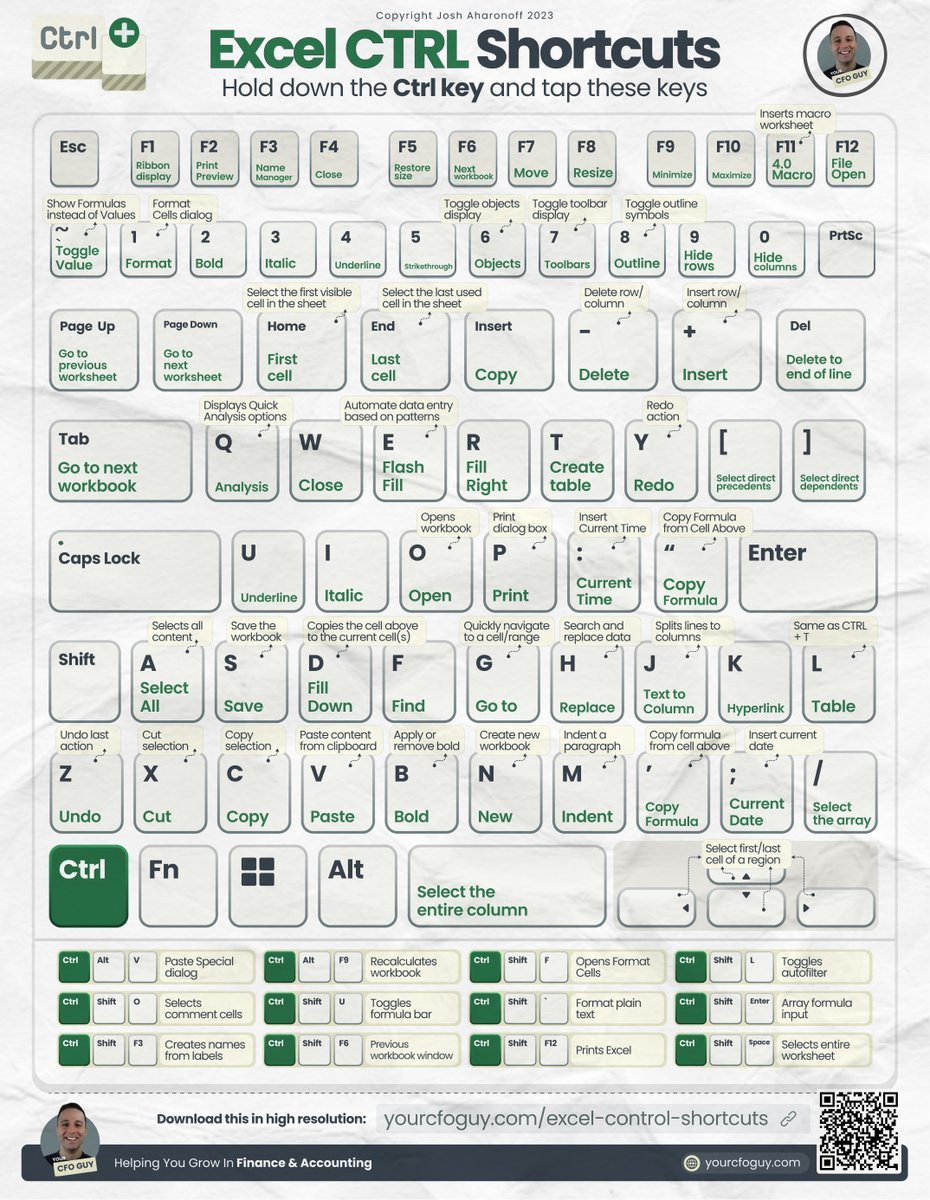
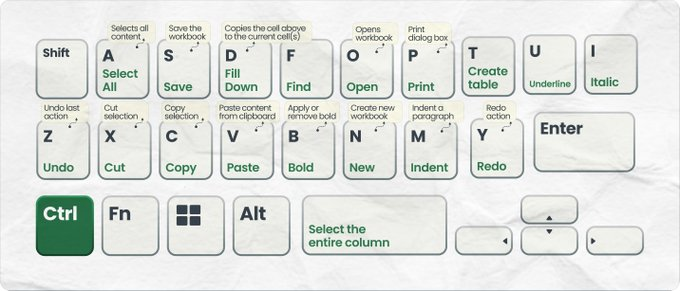
THE EASY ONES TO REMEMBER
CTRL+S → save
CTRL+O → open
CTRL+N → new
CTRL+C → copy
CTRL+X → cut
CTRL+V → paste
CTRL+B → bold
CTRL+U → underline
CTRL+I → italic
CTRL+F → find
CTRL+A → select all
CTRL+T → insert table
CTRL+P → print
CTRL+Z → undo
CTRL +Y → redo
CTRL+S → save
CTRL+O → open
CTRL+N → new
CTRL+C → copy
CTRL+X → cut
CTRL+V → paste
CTRL+B → bold
CTRL+U → underline
CTRL+I → italic
CTRL+F → find
CTRL+A → select all
CTRL+T → insert table
CTRL+P → print
CTRL+Z → undo
CTRL +Y → redo
THE REALLY USEFUL ONES
CTRL+ARROW KEYS → Jump to first/last cell
CTRL+SPACE → select column
CTRL+1 → format cells
CTRL+PgUp/Dn → toggle up/down tabs
CTRL + [ → select direct precedents
CTRL + ] → select direct dependents
CTRL + - → delete col/row
CTRL + (+) → insert //
CTRL+ARROW KEYS → Jump to first/last cell
CTRL+SPACE → select column
CTRL+1 → format cells
CTRL+PgUp/Dn → toggle up/down tabs
CTRL + [ → select direct precedents
CTRL + ] → select direct dependents
CTRL + - → delete col/row
CTRL + (+) → insert //

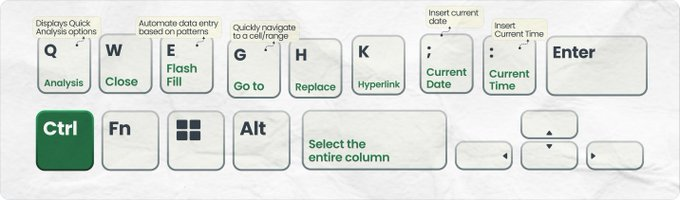
THE ONES YOU MAY NOT HAVE KNOWN
CTRL + Q → analysis
CTRL + W → close
CTRL + E → flash fill
CTRL + G → go to
CTRL + H → replace
CTRL + K → hyperlink
CTRL + : → insert time
CTRL + ; → insert date
CTRL + Q → analysis
CTRL + W → close
CTRL + E → flash fill
CTRL + G → go to
CTRL + H → replace
CTRL + K → hyperlink
CTRL + : → insert time
CTRL + ; → insert date
THE ONES USING 3 KEYS
CTRL+ALT +V → opens paste special box
CTRL+SHIFT+ ` → convert format to plain text
CTRL+SHIFT+O → select comment cells
CTRL+SHIFT+U → toggle formula bar
CTRL+SHIFT+L → // filters
CTRL+SHIFT+F3 → Create named range
CTRL+SHIFT+F6 → Prev workbk window
CTRL+ALT +V → opens paste special box
CTRL+SHIFT+ ` → convert format to plain text
CTRL+SHIFT+O → select comment cells
CTRL+SHIFT+U → toggle formula bar
CTRL+SHIFT+L → // filters
CTRL+SHIFT+F3 → Create named range
CTRL+SHIFT+F6 → Prev workbk window

I’ve done my best to aggregate every single excel keyboard shortcut using the CTRL key…
but there are even more out there using the ALT key, which are coming soon :)
🚩 If you enjoyed this, consider joining my newsletter
yourcfoguy.com
but there are even more out there using the ALT key, which are coming soon :)
🚩 If you enjoyed this, consider joining my newsletter
yourcfoguy.com

Loading suggestions...