

Networking concepts are core for any individual involved in tech not only limited to DevOps Engineer.
Everything you need to know about networking as a DevOps engineer in 11 minutes✨
A thread ...🧵
Day01/30 of #30daysofdevops
Everything you need to know about networking as a DevOps engineer in 11 minutes✨
A thread ...🧵
Day01/30 of #30daysofdevops
👉OSI MODEL:
The Open Systems Interconnection (OSI) model, though not directly used in DevOps, offers a valuable framework for understanding network communication within an application's deployment environment.
The Open Systems Interconnection (OSI) model, though not directly used in DevOps, offers a valuable framework for understanding network communication within an application's deployment environment.
This 7-layer model, built upon the principle of data breakdown, allows each layer to perform specific tasks and interact with the layer above it.
Understanding the functionalities of these layers empowers DevOps professionals to efficiently troubleshoot network-related issues.
Understanding the functionalities of these layers empowers DevOps professionals to efficiently troubleshoot network-related issues.
By pinpointing problems to the specific layer where they occur, they can streamline the debugging process and ensure optimal application performance within the network infrastructure.
Layer 1: Physical
The Physical layer, the foundation of network communication, deals with the physical transmission of data. It transforms information into electrical signals suitable for the chosen medium (e.g., cables, wireless).
The Physical layer, the foundation of network communication, deals with the physical transmission of data. It transforms information into electrical signals suitable for the chosen medium (e.g., cables, wireless).
For instance, knowledge of voltage levels, cable standards, and transmission distances helps pinpoint potential physical infrastructure problems impacting application deployment or performance.
Layer 2: Data Link
The Data Link layer, crucial for local network communication, encapsulates data into frames and manages their delivery within a single network segment.
Understanding this layer can aid DevOps teams in troubleshooting network connectivity issues.
The Data Link layer, crucial for local network communication, encapsulates data into frames and manages their delivery within a single network segment.
Understanding this layer can aid DevOps teams in troubleshooting network connectivity issues.
The Data Link layer employs error detection and correction mechanisms, helping identify and potentially rectify data transmission errors that might hinder application performance or communication within the deployment environment.
Layer 3: Network
The Network layer, the internet's backbone, governs communication across interconnected networks. It determines the optimal path (routing) for data packets to reach their destination, potentially fragmenting and reassembling them for efficient transmission.
The Network layer, the internet's backbone, governs communication across interconnected networks. It determines the optimal path (routing) for data packets to reach their destination, potentially fragmenting and reassembling them for efficient transmission.
By recognizing the importance of routing protocols and potential bottlenecks within the network infrastructure, DevOps teams can work towards seamless communication within distributed application environments.
The Transport layer manages reliable communication between applications on different hosts. It offers connection-oriented and connectionless services, ensuring data delivery and flow control.
Understanding Transport layer protocols like TCP and UDP can be beneficial when troubleshooting application connectivity issues.
Identifying data flow discrepancies within this layer can help pinpoint potential causes for application malfunctions or performance degradation.
Identifying data flow discrepancies within this layer can help pinpoint potential causes for application malfunctions or performance degradation.
Layer 5: Session
The Session layer, responsible for managing communication sessions between applications, maintains connections, handles temporary closures, and facilitates synchronization of data streams.
This layer can aid in troubleshooting certain application-level issues.
The Session layer, responsible for managing communication sessions between applications, maintains connections, handles temporary closures, and facilitates synchronization of data streams.
This layer can aid in troubleshooting certain application-level issues.
If persistent communication disruptions or data synchronization problems occur, knowledge of Session layer protocols can help pinpoint the root cause.
Investigating issues related to session establishment, timeouts, potentially leading to swifter resolution of application down.
Investigating issues related to session establishment, timeouts, potentially leading to swifter resolution of application down.
Layer 6: Presentation
The Presentation layer, often referred to as the "Syntax layer," focuses on ensuring data exchange is interpretable by the receiving system. It handles data formatting, compression, and encryption.
The Presentation layer, often referred to as the "Syntax layer," focuses on ensuring data exchange is interpretable by the receiving system. It handles data formatting, compression, and encryption.
If an application encounters issues with data compatibility or encoding discrepancies during communication, familiarity with Presentation layer functions can help identify potential causes.
Layer 7: Application
The Application layer, the user interface of the OSI model, facilitates direct interaction with applications through protocols like HTTP, DNS, FTP, and SSH.
The Application layer, the user interface of the OSI model, facilitates direct interaction with applications through protocols like HTTP, DNS, FTP, and SSH.
By ensuring compatibility with these application-level protocols, DevOps teams can guarantee seamless communication between applications, services, and users within the deployed environment.
You are reading this tweet on this layer only it is that important.
You are reading this tweet on this layer only it is that important.
TCP/IP vs. OSI Model: A DevOps Perspective
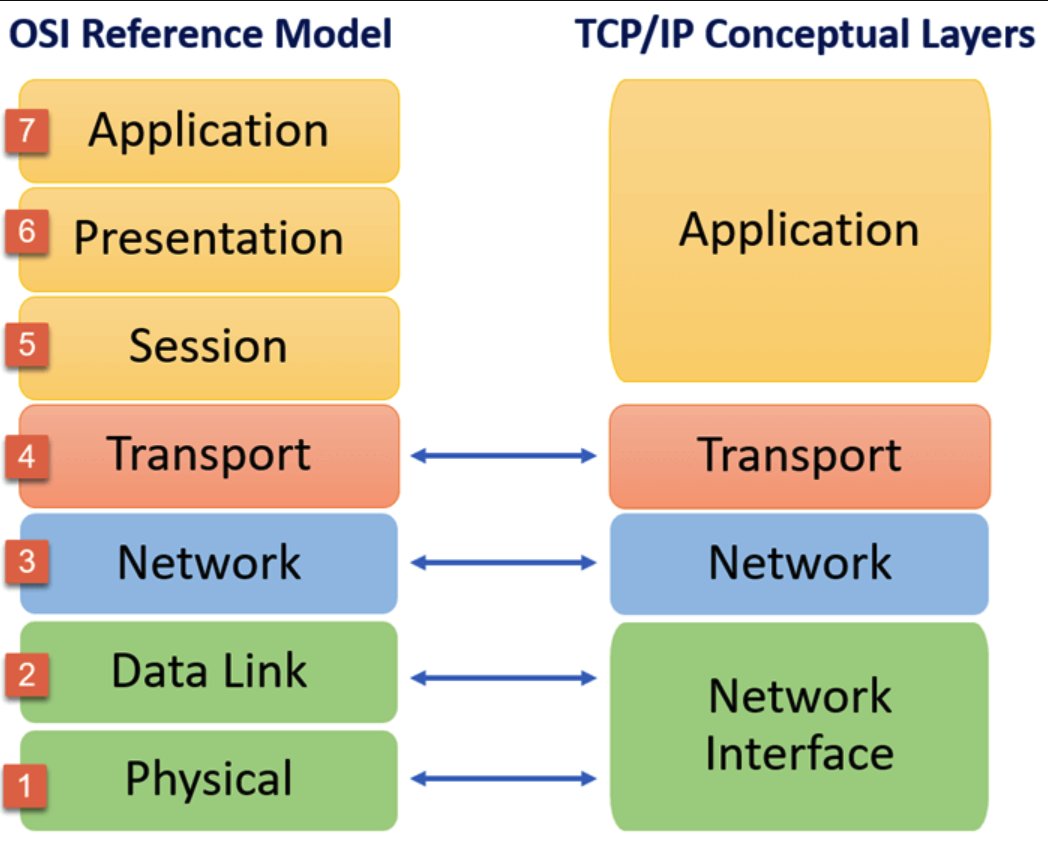
While the OSI model provides a foundational understanding of network communication, its complexity often leads to practical challenges. The TCP/IP model, widely used in DevOps, offers a simpler and more practical alternative.
While the OSI model provides a foundational understanding of network communication, its complexity often leads to practical challenges. The TCP/IP model, widely used in DevOps, offers a simpler and more practical alternative.
Here's a breakdown of the key differences:
Layers: TCP/IP has four layers (Network Interface, Network, Transport, Application) compared to OSI's seven.
Layers: TCP/IP has four layers (Network Interface, Network, Transport, Application) compared to OSI's seven.
Structure: TCP/IP combines OSI's top three layers (Application, Presentation, Session) into a single Application layer, and merges the bottom two layers (Data Link, Physical) into the Network Interface layer.
While they primarily work with the higher layers (Application, Transport), familiarity with the lower layers (Network, Network Interface) aids in troubleshooting network-related issues affecting application deployment and performance.
Focus on the Application layer for process-to-process communication (e.g., HTTP) and the Transport layer for crucial concepts like connection management and reliable data delivery.
These layers are vital for troubleshooting application issues within the network infrastructure.
These layers are vital for troubleshooting application issues within the network infrastructure.
TCP vs. UDP: Understanding the Trade-off
Within the Transport layer of TCP/IP, two key protocols emerge: TCP and UDP.
Choosing the right one depends on the application's priorities.
Within the Transport layer of TCP/IP, two key protocols emerge: TCP and UDP.
Choosing the right one depends on the application's priorities.
TCP:
Connection-oriented, reliable, and ensures data integrity through error checking and retransmission. Ideal for applications like file transfers or email where data accuracy is critical.
Connection-oriented, reliable, and ensures data integrity through error checking and retransmission. Ideal for applications like file transfers or email where data accuracy is critical.
UDP:
Connectionless, faster, and prioritizes speed over complete data delivery. Suitable for applications like streaming media or gaming where occasional data loss is acceptable.
Connectionless, faster, and prioritizes speed over complete data delivery. Suitable for applications like streaming media or gaming where occasional data loss is acceptable.
Ports and Protocols in TCP/IP: A DevOps Perspective
The Transport layer of TCP/IP introduces ports, acting as digital identifiers that match incoming data with the appropriate application. Understanding commonly used ports like:
The Transport layer of TCP/IP introduces ports, acting as digital identifiers that match incoming data with the appropriate application. Understanding commonly used ports like:
22 (SSH): Secure remote access and file transfer
53 (DNS): Domain name resolution
80 (HTTP): Serving web pages (non-secure)
443 (HTTPS): Serving web pages securely
53 (DNS): Domain name resolution
80 (HTTP): Serving web pages (non-secure)
443 (HTTPS): Serving web pages securely
Port Security:
While most ports are non-privileged, "well-known ports" (1-1023) require elevated permissions. As a security best practice, DevOps professionals should:
Avoid running web servers as root.
Assign minimal permissions to services.
Utilize non-privileged ports.
While most ports are non-privileged, "well-known ports" (1-1023) require elevated permissions. As a security best practice, DevOps professionals should:
Avoid running web servers as root.
Assign minimal permissions to services.
Utilize non-privileged ports.
IP Subnetting
An IP address is a 32-bit number that uniquely identifies a device on a network.
It is divided into four octets, each of which is an 8-bit number.
A subnet mask is used to divide an IP network into smaller networks, called subnets.
An IP address is a 32-bit number that uniquely identifies a device on a network.
It is divided into four octets, each of which is an 8-bit number.
A subnet mask is used to divide an IP network into smaller networks, called subnets.
This allows for more efficient use of IP addresses and improved network security.
CIDR (Classless Inter-Domain Routing)
CIDR is a newer way of assigning IP addresses that eliminates the limitations of classful addressing.
CIDR (Classless Inter-Domain Routing)
CIDR is a newer way of assigning IP addresses that eliminates the limitations of classful addressing.
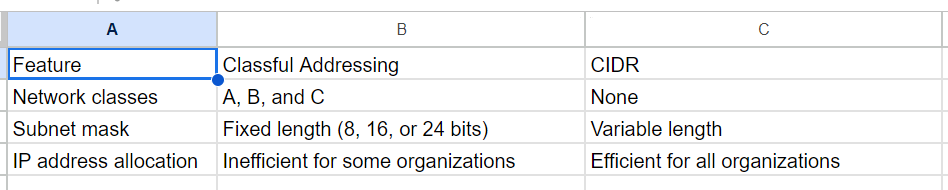
Classful addressing divides IP addresses into classes (A, B, and C) based on the number of bits in the network prefix.
This can lead to inefficient use of IP addresses, as some organizations may need more or fewer addresses than a single class can provide.
This can lead to inefficient use of IP addresses, as some organizations may need more or fewer addresses than a single class can provide.
CIDR, on the other hand, allows for the creation of subnets of any size. This is done by specifying a subnet mask in CIDR notation, which consists of a slash (/) followed by the number of bits in the network prefix.
For example, a subnet mask of 255.255.255.0 is equivalent to a CIDR notation of /24, which means that the first 24 bits of the IP address are used for the network prefix, and the remaining 8 bits are used for the host address.
Here is a table that summarizes the key differences between classful addressing and CIDR:
Benefits of CIDR
CIDR offers several benefits over classful addressing, including:
More efficient use of IP addresses: CIDR allows for the creation of subnets of any size, which can help to reduce IP address waste.
CIDR offers several benefits over classful addressing, including:
More efficient use of IP addresses: CIDR allows for the creation of subnets of any size, which can help to reduce IP address waste.
Improved network security:
CIDR can be used to create separate subnets for different security groups, which can help to isolate security breaches.
Easier network management:
CIDR can simplify network management by making it easier to track and manage IP addresses.
CIDR can be used to create separate subnets for different security groups, which can help to isolate security breaches.
Easier network management:
CIDR can simplify network management by making it easier to track and manage IP addresses.
Routing: The Network Highway
Routing acts like the highway system of the internet, directing data packets (information) from one network to another.
Routing acts like the highway system of the internet, directing data packets (information) from one network to another.
Similar to choosing different roads based on distance and destination, routers select the most efficient path for data to travel across various networks, ensuring its delivery to the right recipient.
DNS: Bridging the Language Gap
The Domain Name System (DNS) acts as a translator between humans and computers.
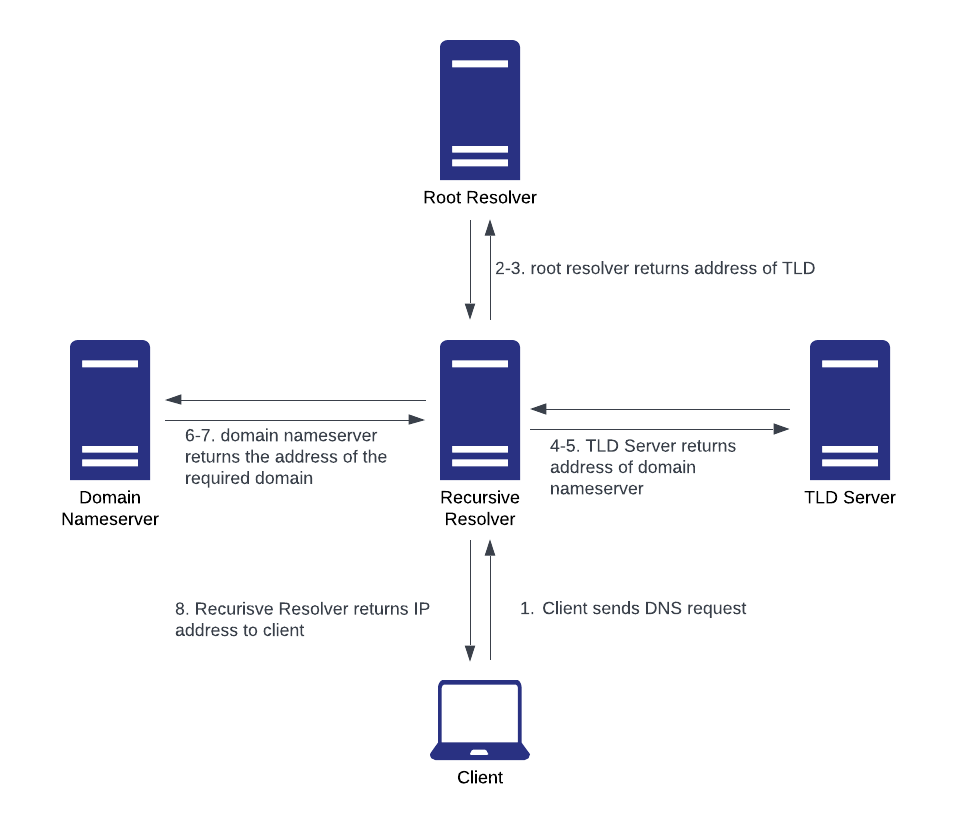
Humans navigate the web using domain names (e.g., google.com), while computers rely on IP addresses for communication. DNS bridges this gap by:
The Domain Name System (DNS) acts as a translator between humans and computers.
Humans navigate the web using domain names (e.g., google.com), while computers rely on IP addresses for communication. DNS bridges this gap by:
👉Translating human-readable domain names into machine-readable IP addresses and vice versa.
👉Employing a hierarchical structure involving root servers, TLD servers, and authoritative nameservers to locate the correct IP address.
👉Employing a hierarchical structure involving root servers, TLD servers, and authoritative nameservers to locate the correct IP address.
Thanks for sticking around.
This post was part of my #30daysofdevops challenge covering the fundamentals of Networking concepts.
Bookmark this for your next interview 🔖.
Repost such that reaches to it's right audience.
Thank You ... 🙂
This post was part of my #30daysofdevops challenge covering the fundamentals of Networking concepts.
Bookmark this for your next interview 🔖.
Repost such that reaches to it's right audience.
Thank You ... 🙂
Loading suggestions...