

DAY 4 of #20DaysOfReact 🚀
Topics Covered :
1. Conditional Rendering
2. Component Lifecycle
What is conditional rendering?
Conditional rendering refers to the practice of displaying different content or components based on certain conditions or criteria. It allows you to control what gets rendered in the user interface (UI) based on the state of your application, user interactions, or any other condition you define.
Why conditional rendering?
Dynamic Content: Conditional rendering lets you display different content or components based on specific conditions.
User Experience: It enhances user experience by showing or hiding elements, handling errors, and offering responsive interfaces.
Performance: Helps optimize performance by rendering only what's needed, reducing unnecessary updates.
Authentication: Used to control access to parts of an app based on user authentication.
Error Handling: Allows for displaying error messages or components when issues occur.
Multi-Platform Support: Useful for creating responsive designs for different devices.
Conditional Rendering Techniques:
-if Statements
-Ternary Operator (? :)
-Logical Operators (&& and ||) etc.
Topics Covered :
1. Conditional Rendering
2. Component Lifecycle
What is conditional rendering?
Conditional rendering refers to the practice of displaying different content or components based on certain conditions or criteria. It allows you to control what gets rendered in the user interface (UI) based on the state of your application, user interactions, or any other condition you define.
Why conditional rendering?
Dynamic Content: Conditional rendering lets you display different content or components based on specific conditions.
User Experience: It enhances user experience by showing or hiding elements, handling errors, and offering responsive interfaces.
Performance: Helps optimize performance by rendering only what's needed, reducing unnecessary updates.
Authentication: Used to control access to parts of an app based on user authentication.
Error Handling: Allows for displaying error messages or components when issues occur.
Multi-Platform Support: Useful for creating responsive designs for different devices.
Conditional Rendering Techniques:
-if Statements
-Ternary Operator (? :)
-Logical Operators (&& and ||) etc.

Component Lifecycle
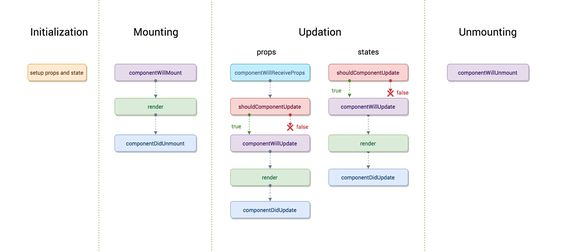
Components have a lifecycle that consists of different phases. Each phase has a set of lifecycle methods that are called at specific points in the component's lifecycle. These methods allow you to control the component's behavior and perform specific actions at different stages of its lifecycle.
There are typically three main stages in a component's lifecycle:
1. Mounting Stage: This is when a component is created and added to the DOM. It consists of three lifecycle methods:
- constructor: Component initialization.
- render: Rendering the component's UI.
- componentDidMount: Executed after the component is added to the DOM. It's often used for initial data fetching or setting up event listeners.
2. Updating Stage: This stage occurs when a component re-renders due to changes in its props or state. Key lifecycle methods in this stage include:
- shouldComponentUpdate: Allows you to optimize rendering by deciding whether or not the component should update.
- render: Re-rendering the component's UI.
- componentDidUpdate: Executed after the component re-renders. It's often used for tasks like updating the DOM or fetching new data.
3. Unmounting Stage: This is the stage where a component is removed from the DOM. The primary method used in this stage is:
- componentWillUnmount: Executed just before the component is removed. It's used for cleaning up resources like event listeners to prevent memory leaks.
Components have a lifecycle that consists of different phases. Each phase has a set of lifecycle methods that are called at specific points in the component's lifecycle. These methods allow you to control the component's behavior and perform specific actions at different stages of its lifecycle.
There are typically three main stages in a component's lifecycle:
1. Mounting Stage: This is when a component is created and added to the DOM. It consists of three lifecycle methods:
- constructor: Component initialization.
- render: Rendering the component's UI.
- componentDidMount: Executed after the component is added to the DOM. It's often used for initial data fetching or setting up event listeners.
2. Updating Stage: This stage occurs when a component re-renders due to changes in its props or state. Key lifecycle methods in this stage include:
- shouldComponentUpdate: Allows you to optimize rendering by deciding whether or not the component should update.
- render: Re-rendering the component's UI.
- componentDidUpdate: Executed after the component re-renders. It's often used for tasks like updating the DOM or fetching new data.
3. Unmounting Stage: This is the stage where a component is removed from the DOM. The primary method used in this stage is:
- componentWillUnmount: Executed just before the component is removed. It's used for cleaning up resources like event listeners to prevent memory leaks.
Loading suggestions...