

Build a LLM app with RAG to chat with YouTube videos in just 30 lines of Python Code (step-by-step instructions):
1. Import necessary libraries
• Streamlit for building the web app
• Embedchain for the RAG functionality
• tempfile for creating temporary files and directories
• Streamlit for building the web app
• Embedchain for the RAG functionality
• tempfile for creating temporary files and directories

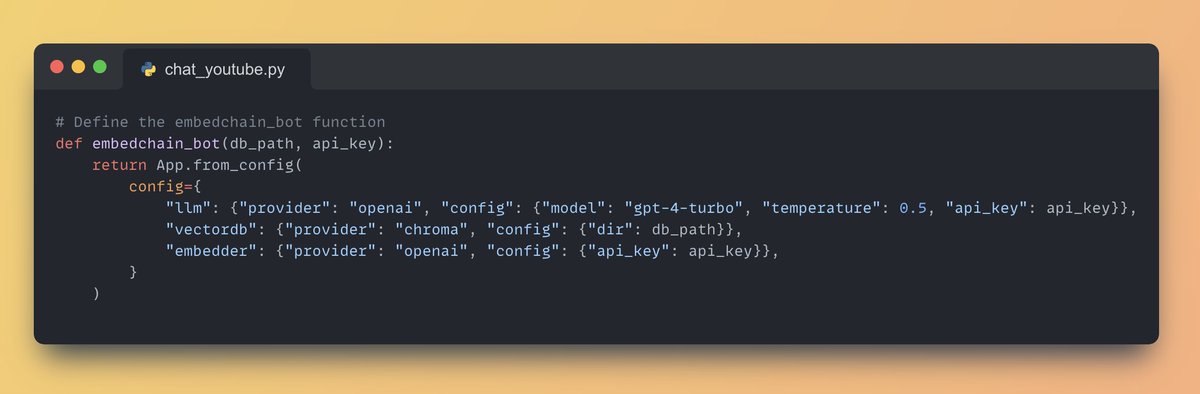
2. Configure the Embedchain App
For this application we will use GPT-4 Turbo, you can choose from cohere, anthropic or any other LLM of your choice.
Select the vector database as the opensource chroma db (you are free to choose any other vector database of your choice)
For this application we will use GPT-4 Turbo, you can choose from cohere, anthropic or any other LLM of your choice.
Select the vector database as the opensource chroma db (you are free to choose any other vector database of your choice)
3. Set up the Streamlit App
Streamlit lets you create user interface with just python code, for this app we will:
• Add a title to the app using 'st.title()'
• Create a text input box for the user to enter their OpenAI API key using 'st.text_input()'
Streamlit lets you create user interface with just python code, for this app we will:
• Add a title to the app using 'st.title()'
• Create a text input box for the user to enter their OpenAI API key using 'st.text_input()'

4. Initialize the Embedchain App
• If the OpenAI API key is provided, create a temporary directory for the vector database using 'tempfile.mkdtemp()'
• Initialize the Embedchain app using the 'embedchain_bot' function
• If the OpenAI API key is provided, create a temporary directory for the vector database using 'tempfile.mkdtemp()'
• Initialize the Embedchain app using the 'embedchain_bot' function

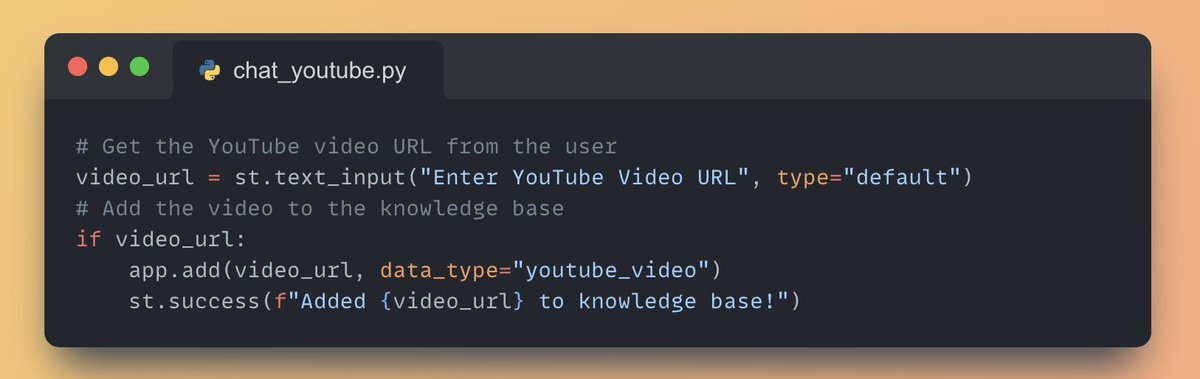
5. Get the YouTube Video URL from the user and add the video to the knowledge base
• Use 'st.text_input()' to get the YouTube video URL from the user
• Given the video URL, add it to the embedchain application
• Use 'st.text_input()' to get the YouTube video URL from the user
• Given the video URL, add it to the embedchain application
6. Ask question about the YouTube video and display the answer
• Create a text input for the user to enter their question using 'st.text_input()'
• If a question is asked, get the answer from the Embedchain app and display it using 'st.write()'
• Create a text input for the user to enter their question using 'st.text_input()'
• If a question is asked, get the answer from the Embedchain app and display it using 'st.write()'

Full RAG Application Code to Chat with YouTube Videos👇

Working Application demo using Streamlit
Paste the above code in vscode and run the following command: 'streamlit run chat_youtube.py'
Paste the above code in vscode and run the following command: 'streamlit run chat_youtube.py'

If you find this useful, RT to share it with your friends.
Don't forget to follow me @Saboo_Shubham_ for more such LLMs tips and tutorials.
Don't forget to follow me @Saboo_Shubham_ for more such LLMs tips and tutorials.
Loading suggestions...