

Build a multimodal LLM chatbot using Gemini Flash in just 30 lines of Python Code (step-by-step instructions):
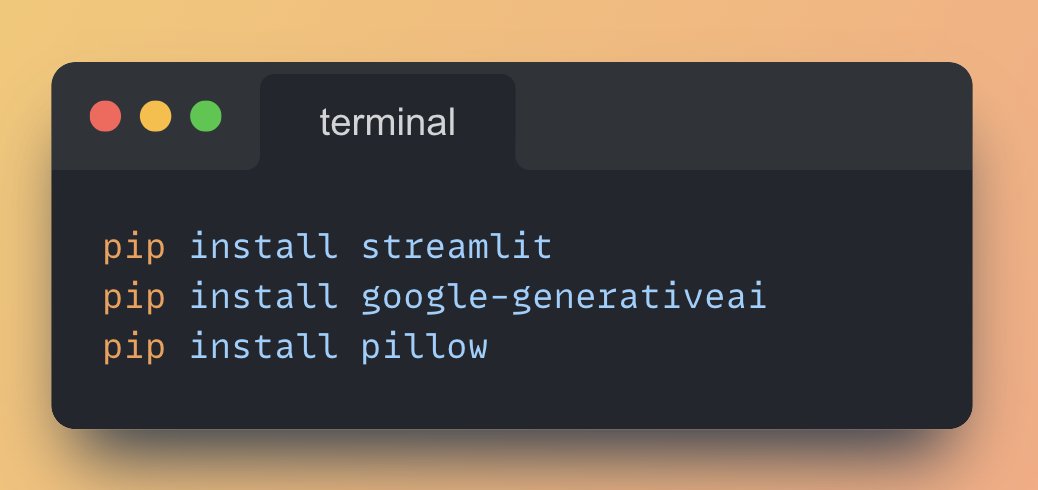
1. Install the necessary Python Libraries
Run the following command from your terminal.
Run the following command from your terminal.
2. Import necessary libraries
• Streamlit for building the web app
• google.generativeai for accessing the Gemini Flash model
• PIL for image processing
• Streamlit for building the web app
• google.generativeai for accessing the Gemini Flash model
• PIL for image processing

3. Set up the Streamlit App
• Set the page title and layout using 'st.set_page_config()'
• Add a title to the app using 'st.title()'
• Add a description for the app using 'st.caption()'
• Set the page title and layout using 'st.set_page_config()'
• Add a title to the app using 'st.title()'
• Add a description for the app using 'st.caption()'

4. Set up the Gemini Flash Model
• Create a text input for the user to enter their Google API key using 'st.text_input()'
• Configure the genai library with the API key
• Create an instance of the Gemini Flash model
• Create a text input for the user to enter their Google API key using 'st.text_input()'
• Configure the genai library with the API key
• Create an instance of the Gemini Flash model

5. Initialize Chat History and Sidebar for Image Upload
• Initialize the chat history using Streamlit's session state
• Create sidebar for image upload using 'st.sidebar'
• Allow users to upload image using 'st.file_uploader()'
• Display the uploaded image using 'st.image()'
• Initialize the chat history using Streamlit's session state
• Create sidebar for image upload using 'st.sidebar'
• Allow users to upload image using 'st.file_uploader()'
• Display the uploaded image using 'st.image()'


7. Generate Response and Display
• If a prompt is entered, add the user message to the chat history and display it
• If an image is uploaded, add it to the inputs list
• Generate a response using the Gemini Flash
• Display the assistant response in the chat message container
• If a prompt is entered, add the user message to the chat history and display it
• If an image is uploaded, add it to the inputs list
• Generate a response using the Gemini Flash
• Display the assistant response in the chat message container

Full Multimodal Chatbot code using Google's Gemini Flash ⚡️👇

Working Application demo using Streamlit
Paste the above code in vscode or pycharm and run the following command: 'streamlit run gemini_multimodal_chatbot.py'
Paste the above code in vscode or pycharm and run the following command: 'streamlit run gemini_multimodal_chatbot.py'

Find all the awesome LLM Apps demo with RAG in the following Github Repo.
P.S: Don't forget to star the repo to show your support 🌟
github.com
P.S: Don't forget to star the repo to show your support 🌟
github.com

If you find this useful, RT to share it with your friends.
Don't forget to follow me @Saboo_Shubham_ for more such LLMs tips and tutorials.
x.com
Don't forget to follow me @Saboo_Shubham_ for more such LLMs tips and tutorials.
x.com
Loading suggestions...