

Apple has sold over 500 million Macs.
However, most users are unaware of their full capabilities.
Here are 7 things your Mac can do that might surprise you.
However, most users are unaware of their full capabilities.
Here are 7 things your Mac can do that might surprise you.

1/ Specific Screenshots:
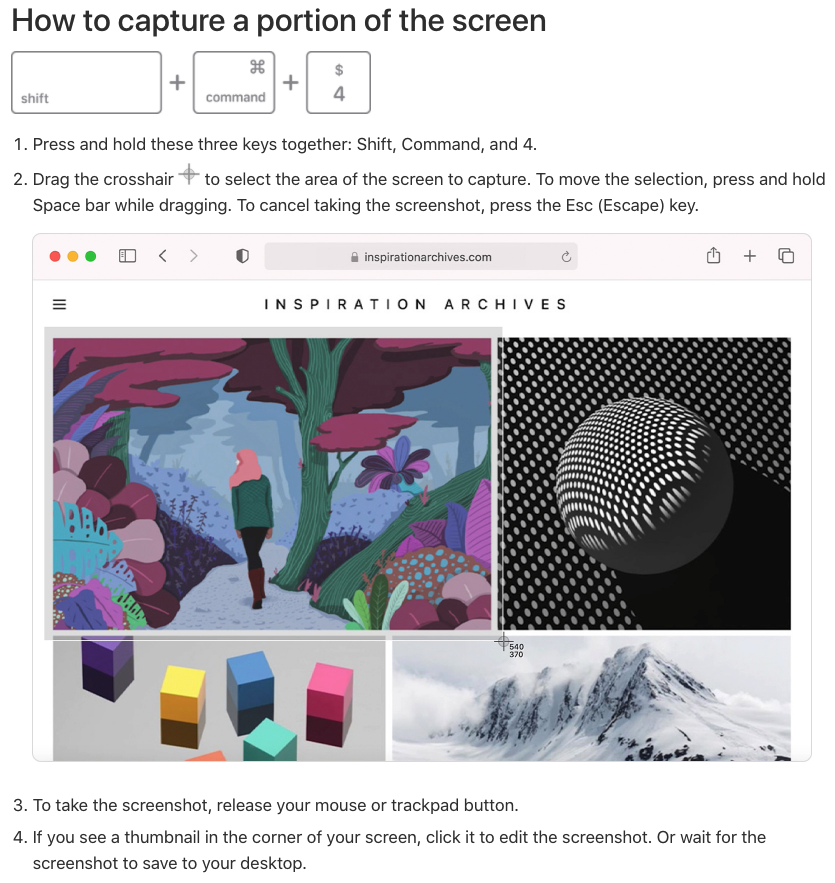
SHIFT+CMD+3 will capture your entire screen.
Did you know you can also narrow your capture to a specific portion?
It's easy, & now that I know it exists, I use it every day.
A simple SHIFT+CMD+4 and you're on your way.
SHIFT+CMD+3 will capture your entire screen.
Did you know you can also narrow your capture to a specific portion?
It's easy, & now that I know it exists, I use it every day.
A simple SHIFT+CMD+4 and you're on your way.
2/ Digital Signatures:
Have a PDF you need to sign?
Let's skip all the printing, physical signing, scanning, etc.
Using the "preview" app you can easily create a digital signature.
All you need is a pen, a white piece of paper, & your Mac's camera.
▻ youtube.com
Have a PDF you need to sign?
Let's skip all the printing, physical signing, scanning, etc.
Using the "preview" app you can easily create a digital signature.
All you need is a pen, a white piece of paper, & your Mac's camera.
▻ youtube.com

3/ Annotate PDF's
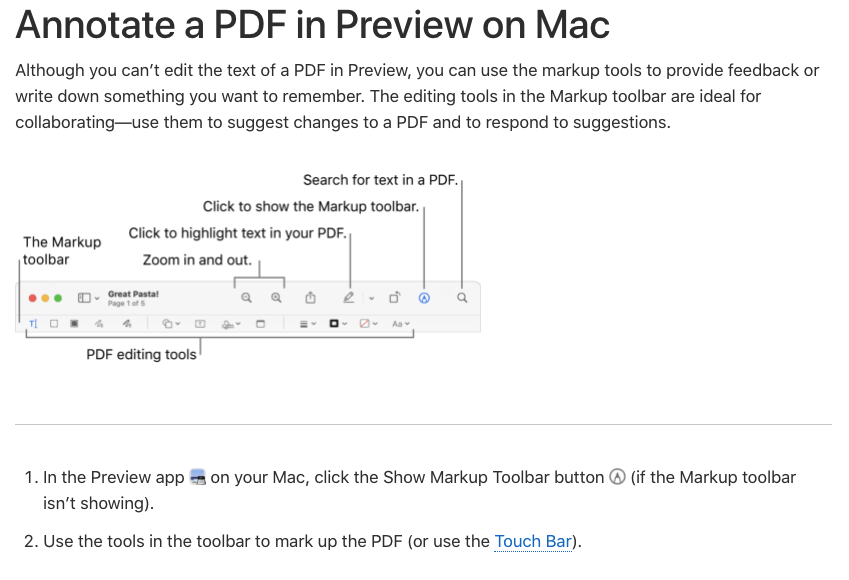
While the preview app doesn't allow for text editing, it does provide some other pretty cool features.
By selecting the "markup" toolbar, you can unlock multiple collaborative options:
•Add notes
•Suggest changes
•Sketch, draw, & share ideas.
Here's how:
While the preview app doesn't allow for text editing, it does provide some other pretty cool features.
By selecting the "markup" toolbar, you can unlock multiple collaborative options:
•Add notes
•Suggest changes
•Sketch, draw, & share ideas.
Here's how:
4/ Keyboard Shortcuts:
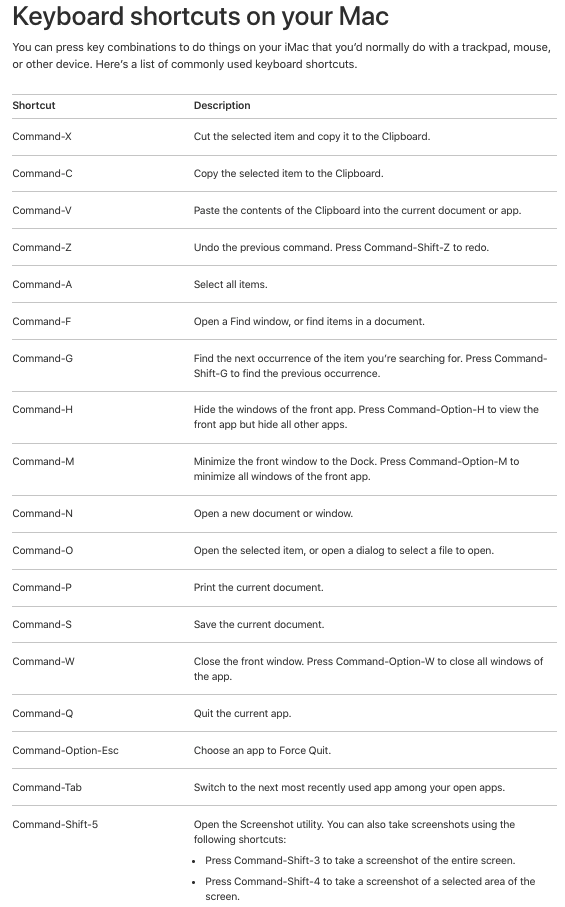
I was sitting in my office recently & noticed one of my coworkers seemingly flying through tasks.
Without ever using his mouse.
I thought, "man, I've got to learn keyboard shortcuts."
With this in mind, here are the basics to get us started.
I was sitting in my office recently & noticed one of my coworkers seemingly flying through tasks.
Without ever using his mouse.
I thought, "man, I've got to learn keyboard shortcuts."
With this in mind, here are the basics to get us started.
5/ Custom shortcuts:
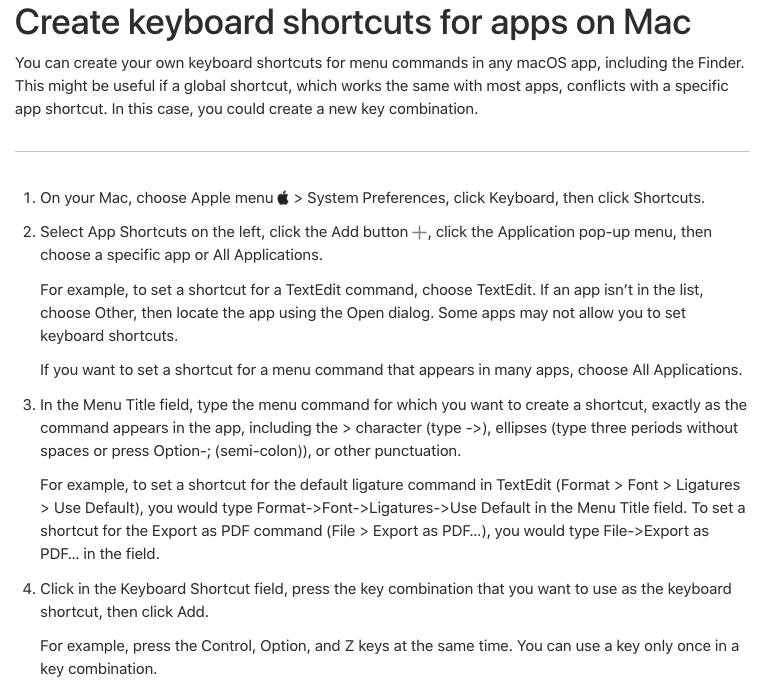
Speaking of keyboard shortcuts, did you know you can make one for literally anything?
Go to:
System Preferences->
Keyboard ->App Shortcuts->Click the + Have a menu option you use all the time, but a shortcut doesn't exist?
No worries.
Create your own!
Speaking of keyboard shortcuts, did you know you can make one for literally anything?
Go to:
System Preferences->
Keyboard ->App Shortcuts->Click the + Have a menu option you use all the time, but a shortcut doesn't exist?
No worries.
Create your own!
Helping People turn into Brand & I can help you achieve
→ Creating quality content on X & LinkedIn
→ Engagement Booster Package
→ Building Meaningful Connections 2k in 30 days
→ Personal Branding
DM let's chat
→ Creating quality content on X & LinkedIn
→ Engagement Booster Package
→ Building Meaningful Connections 2k in 30 days
→ Personal Branding
DM let's chat
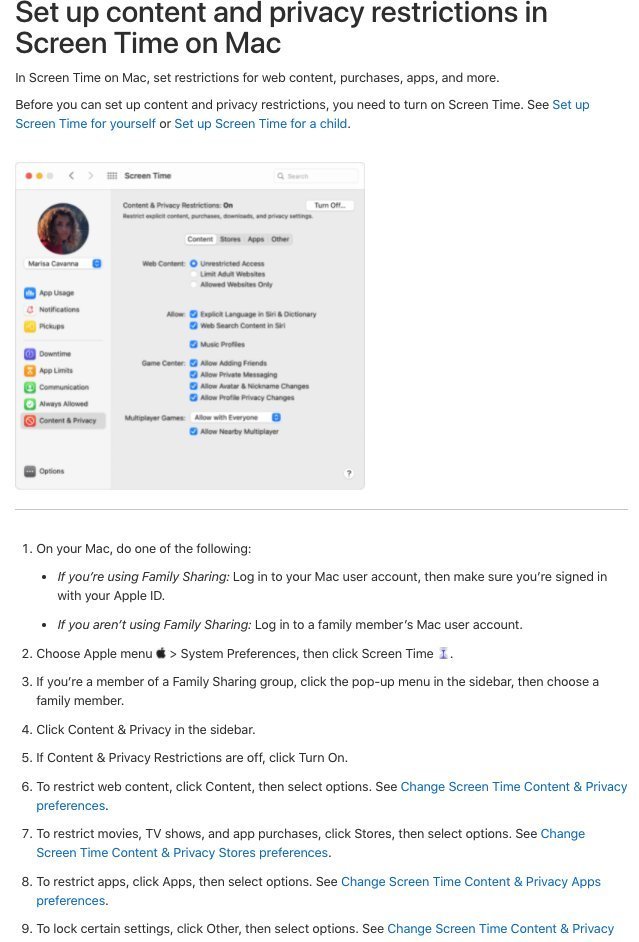
6/ Parental Controls:
Not just for kids...
Using Macs inside your business?
•Lock down purchases
•Restrict password & doc mods
•Select apps employees can access
•Limit content to only that which is "SFW"
Not just for kids...
Using Macs inside your business?
•Lock down purchases
•Restrict password & doc mods
•Select apps employees can access
•Limit content to only that which is "SFW"
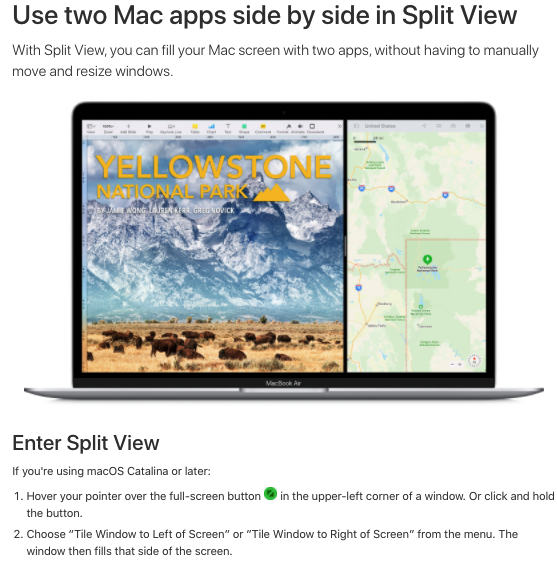
7/ Split View:
If you're like me, you can't have enough screen real estate.
Here's how to 2X your viewable area:
Hover your pointer over the full-screen button in the upper-left corner.
->Tile left or right
->Click a window on the other side
BOOM!
Two apps, one screen
If you're like me, you can't have enough screen real estate.
Here's how to 2X your viewable area:
Hover your pointer over the full-screen button in the upper-left corner.
->Tile left or right
->Click a window on the other side
BOOM!
Two apps, one screen
Want $299 worth of 1000+ ChatGPT Prompts, ChatGPT Bible, and Cheatsheet for 100% FREE?
Subscribe to my daily newsletter and I will send instantly:
🔗8020ai.co
Subscribe to my daily newsletter and I will send instantly:
🔗8020ai.co

That's wrap
If you found this thread helpful:
1. Follow me @arnill_dev more such content.
2. RT the tweet below to share with your audience.
x.com
If you found this thread helpful:
1. Follow me @arnill_dev more such content.
2. RT the tweet below to share with your audience.
x.com
Loading suggestions...