

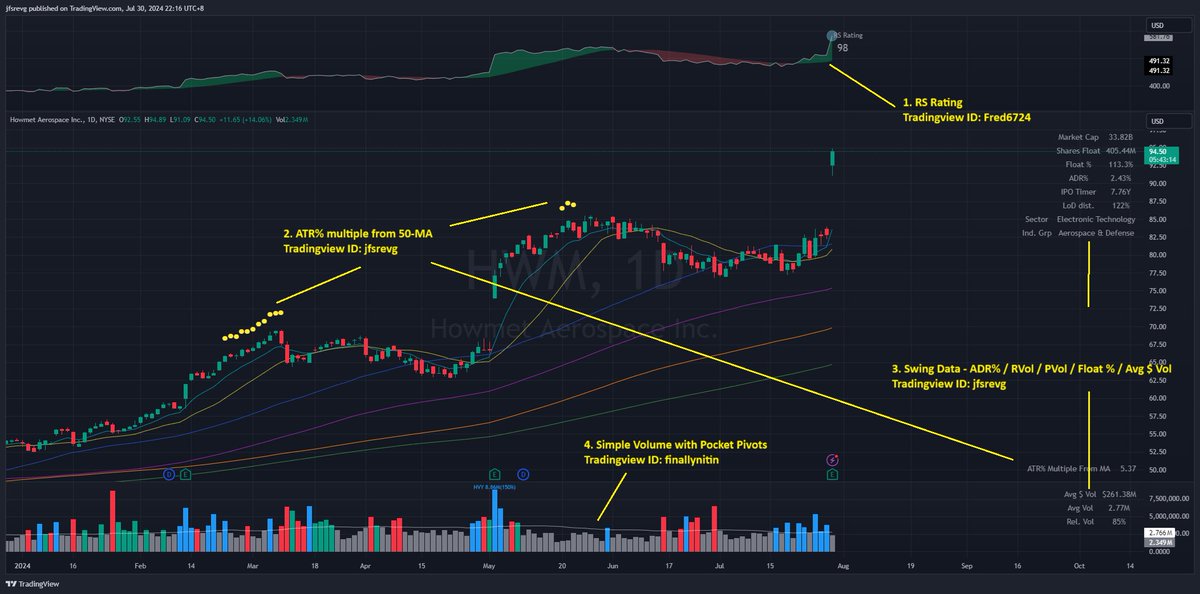
It's time to share my latest @tradingview template, as it's been over 15 months since I last shared it. I've now settled on two separate templates: the default template and the post-earnings template. You may have also noticed how I've overlaid two separate indicators within a single panel for a single data set.
Aside from updating the indicators whenever there's an update, I haven't made any adjustments or feel the need to find a new one for the past year.
Big thanks to @DumbleDax (also the coder for two of my public template) @finallynitin @JohnMuchow for developing the most straightforward and visually pleasing indicators in their niche.
You can find the post below with direct links to the various templates, listed in the order highlighted. If you have any questions about my settings, feel free to leave a comment and I'll post them up. Most of the indicator settings listed are not as straight forward to display it fully within a single screenshot.
Cheers and have a good trading week!
Aside from updating the indicators whenever there's an update, I haven't made any adjustments or feel the need to find a new one for the past year.
Big thanks to @DumbleDax (also the coder for two of my public template) @finallynitin @JohnMuchow for developing the most straightforward and visually pleasing indicators in their niche.
You can find the post below with direct links to the various templates, listed in the order highlighted. If you have any questions about my settings, feel free to leave a comment and I'll post them up. Most of the indicator settings listed are not as straight forward to display it fully within a single screenshot.
Cheers and have a good trading week!


Loading suggestions...