

Chrome’s new features will blow your mind!
Revamp your browsing with Chrome!
Google has just introduced significant enhancements to Chrome, integrating AI directly into the browser. Here are 5 features you’ll love:
Revamp your browsing with Chrome!
Google has just introduced significant enhancements to Chrome, integrating AI directly into the browser. Here are 5 features you’ll love:
Google Lens for Desktop
Now, you can effortlessly select and search any visual content on the web, asking questions without switching tabs.
Now, you can effortlessly select and search any visual content on the web, asking questions without switching tabs.

AI-Powered Overview
Pose detailed follow-up questions and receive thorough AI-generated summaries directly in the side panel.
Pose detailed follow-up questions and receive thorough AI-generated summaries directly in the side panel.

Text Selection from YouTube Videos
Highlight text from video content, such as equations in lectures, and get detailed explanations in the Chrome side panel.
Highlight text from video content, such as equations in lectures, and get detailed explanations in the Chrome side panel.

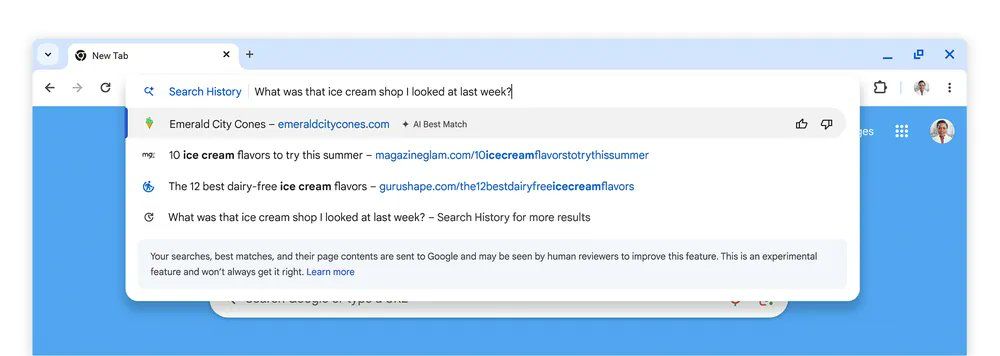
Rediscover Your Browsing History
Looking for a page you visited last week?
Just type a query like, "What was that ice cream shop I found last week?" into your history, and Chrome will find the relevant pages for you.
Looking for a page you visited last week?
Just type a query like, "What was that ice cream shop I found last week?" into your history, and Chrome will find the relevant pages for you.
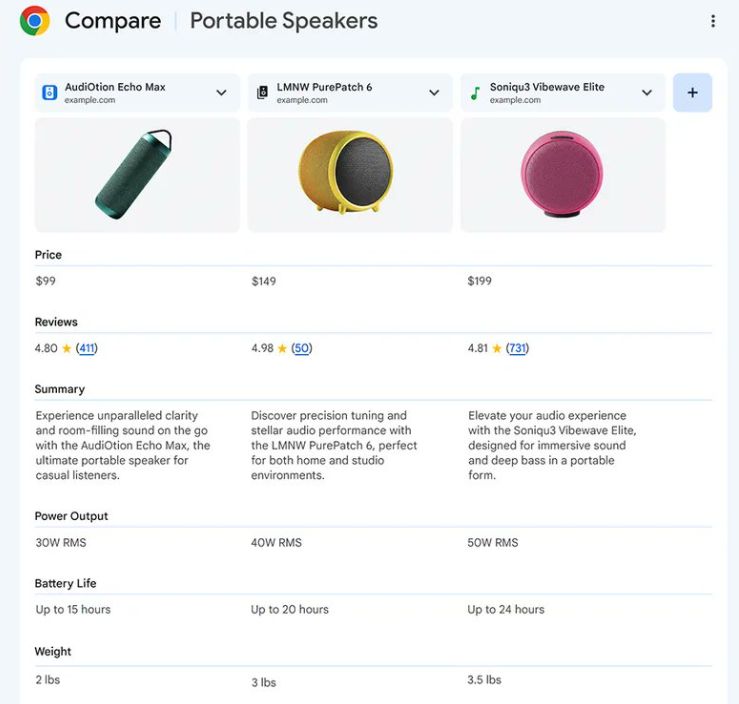
Product Comparison with Tab Compare
Effortlessly compare products across different websites using the new Tab Compare tool.
Effortlessly compare products across different websites using the new Tab Compare tool.
Chrome Actions on Mobile
Get more done directly from your search results with new shortcut buttons. Easily call, get directions, or read reviews with a single tap.
Get more done directly from your search results with new shortcut buttons. Easily call, get directions, or read reviews with a single tap.

Enable AI Features in Chrome:
To start using AI features:
Open Chrome on your computer.
Navigate to Settings > Experimental AI.
Switch on "Try out experimental AI features."
To start using AI features:
Open Chrome on your computer.
Navigate to Settings > Experimental AI.
Switch on "Try out experimental AI features."

Loading suggestions...