

🔷 About HTML Geolocation API - 2
A Thread🧵 👇
A Thread🧵 👇
📌 Handling Errors and Rejections
→ The second parameter of the getCurrentPosition() method is used to handle errors.
It specifies a function to run if it fails to get the user's location.
→ The second parameter of the getCurrentPosition() method is used to handle errors.
It specifies a function to run if it fails to get the user's location.

📌 Location-specific Information
→ This has demonstrated how to show a user's position on a map.
→ Geolocation is also very useful for location-specific information, like:
• Up-to-date local information
• Showing Points-of-interest near the user
→ This has demonstrated how to show a user's position on a map.
→ Geolocation is also very useful for location-specific information, like:
• Up-to-date local information
• Showing Points-of-interest near the user
• Turn-by-turn navigation (GPS)
📌 The getCurrentPosition() Method- Return Data
→ The getCurrentPosition() method returns an object on success.
→ The latitude, longitude and accuracy properties are always returned. The other properties are returned if available.
→ The getCurrentPosition() method returns an object on success.
→ The latitude, longitude and accuracy properties are always returned. The other properties are returned if available.
📌 Geolocation Object Other interesting Methods
→ The Geolocation object also has other interesting methods:
• watchPosition() - Returns the current position of the user and continues to return updated position as the user moves (like the GPS in a car).
→ The Geolocation object also has other interesting methods:
• watchPosition() - Returns the current position of the user and continues to return updated position as the user moves (like the GPS in a car).
• clearWatch() - Stops the watchPosition() method.
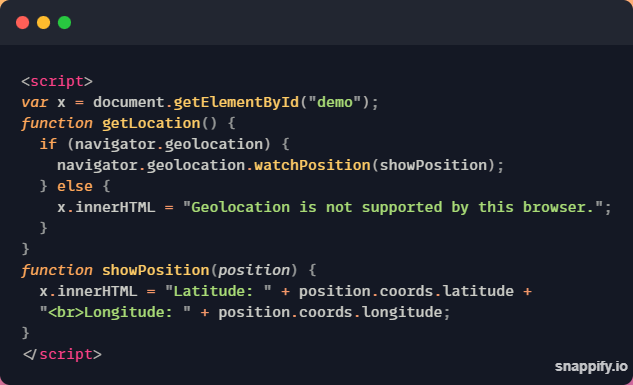
→ The example below shows the watchPosition() method.
→ You need an accurate GPS device to test this (like smartphone).
→ The example below shows the watchPosition() method.
→ You need an accurate GPS device to test this (like smartphone).
Thanks for reading this thread ❤️
If you like it , make sure you:
🔷 Like the tweet
🔷 Retweet the first tweet ⚡
For more content , follow:
@MrunayU
If you like it , make sure you:
🔷 Like the tweet
🔷 Retweet the first tweet ⚡
For more content , follow:
@MrunayU
You can read the unrolled version of this thread here: typefully.com
Loading suggestions...